
WordPress theme development
Custom WordPress Theme Development for Faster, Editable Sites
We build block themes with theme.json, patterns and custom blocks, so your site loads fast, meets accessibility standards and stays easy for your team to edit in the Site Editor.
Quick answer
What do Codefreex’s custom WordPress theme development services include?
Codefreex custom WordPress theme development covers block themes built for Full Site Editing, theme.json design systems, block patterns, template parts, custom Gutenberg blocks, hybrid and child themes, WooCommerce-ready templates and migrations off page builders such as Elementor and Divi. Every theme is built for Core Web Vitals, accessibility and WordPress coding standards, then documented for your team.
540+
Projects delivered
9+
Years in business
23+
Certified experts




Trusted by 540+ growing businesses worldwide












WordPress Theme Development
Your theme decides how fast and flexible WordPress feels
Most slow, fragile WordPress sites share a cause: a multipurpose theme or page builder doing far more work than the site needs. Elementor and Divi make editing visual, but they add layers of wrappers, scripts and stylesheets to every page, and design decisions get scattered across hundreds of individual layouts. Over time the site gets slower, harder to update and risky to redesign.
Modern WordPress offers a better foundation. Block themes use theme.json to define colors, typography and spacing once, then apply them everywhere through the block editor and Site Editor. Codefreex builds custom block themes with patterns, template parts and purpose-built blocks that match your brand exactly, load only what each page needs and let your team build new pages without breaking the design.
What you get
WordPress theme services we deliver
From a new block theme to a careful exit from your page builder, every theme is fast, accessible and easy to edit.
Custom Block Themes
Block themes built for Full Site Editing, with HTML templates, template parts for headers and footers, and style variations, so every part of the site is editable in the Site Editor.
Design Systems in theme.json
Your colors, typography, spacing scale, layout widths and block settings defined once in theme.json, so editors pick from approved options and the design stays consistent on every page.
Block Patterns and Custom Blocks
Ready-made patterns for heroes, pricing tables and testimonials, plus custom Gutenberg blocks built with block.json, React and the Interactivity API when core blocks are not enough.
Page Builder Migrations
We move sites off Elementor, Divi or WPBakery to native blocks, rebuilding layouts as patterns, cleaning up shortcodes and cutting the scripts and markup that slow pages down.
WooCommerce-Ready Themes
Shop, product, cart and checkout templates built with WooCommerce blocks, styled to your brand and tested with the extensions you run, including the block-based checkout.
Standards and Accessibility
Themes that follow WordPress coding standards, pass Theme Check and target WCAG 2.2 AA, with keyboard navigation, focus states and color contrast built in, ready for WordPress.org or ThemeForest review.
Platforms and tools we work with
How we work
How we build your WordPress theme
Clear phases, a named owner for every deliverable and weekly progress you can see.
Audit and Plan
We audit your current theme, plugins, content and performance, then plan the templates, patterns, custom blocks and theme.json design system your site needs.
Design System and Templates
We turn your Figma design into theme.json settings, template parts and core templates, and review them with you on a staging site before building patterns.
Build Blocks and Patterns
We build custom blocks, patterns and WooCommerce templates, migrate content if needed, and test accessibility, Core Web Vitals and browser compatibility on every template.
Launch and Train
We launch with redirects and monitoring, train your editors on the Site Editor and patterns, and keep the theme current as WordPress releases new versions.
Who it is for
Who needs a custom WordPress theme
Sites stuck on page builders
Businesses whose Elementor or Divi site has become slow and hard to edit, and who want native blocks without losing content or rankings.
Brands with strict design systems
Marketing teams that need every page to follow brand rules, with locked styles and approved patterns instead of freeform layouts.
WooCommerce stores
Online stores that want a fast, branded shop, product and checkout experience built on WooCommerce blocks rather than a heavy multipurpose theme.
Theme sellers and agencies
Companies launching themes on WordPress.org or ThemeForest, and agencies that want a reusable starter theme for client projects.
Why teams switch to us
Custom block themes vs. bloated builds
Typical agency
- Multipurpose theme loading every feature on every page
- Page builder markup that drags down Core Web Vitals
- Design changes repeated across hundreds of layouts
- Accessibility checked only after complaints arrive
 Codefreex
- Lean block theme built only for your site
- Native blocks that load styles only where used
- One theme.json change updates the whole site
- WCAG 2.2 AA targeted from the first template
Buyer guide
Custom WordPress theme development: a buyer’s guide
The theme is the foundation of every WordPress site. Here is how block themes work, when to leave a page builder, which quality standards to expect and what drives cost.
Block themes, classic themes and hybrid themes
Classic themes build pages from PHP template files and rely on the Customizer, widgets and menus for site-wide changes. Block themes replace those with HTML templates made of blocks, template parts and a theme.json file, so headers, footers, archives and single templates are all editable in the Site Editor. Block themes are where WordPress core is investing, and new features such as style variations and pattern overrides arrive there first.
Hybrid themes sit in between. They keep PHP templates for complex or legacy parts of a site while adopting theme.json, block patterns and block template parts where they help. A hybrid approach is often the right step for a large existing site that cannot be rebuilt all at once. For new sites we usually recommend a full block theme, and for sites built on someone else’s theme, a child theme keeps your changes safe from updates.
What theme.json, patterns and template parts do
The theme.json file is the control center of a block theme. It defines your color palette, gradients, font families and sizes, spacing scale, layout widths and default block styles, and it decides which design controls editors see. Configure it well and editors cannot pick an off-brand color or a random font size. Fluid typography and spacing presets also handle responsive scaling without a pile of media queries.
Block patterns are pre-designed groups of blocks, such as a hero, feature grid or call to action, that editors insert and fill in. Synced patterns update everywhere at once, and pattern overrides let editors change content while the layout stays fixed. Template parts hold reusable areas such as headers and footers. Together they give your team a library of on-brand building blocks instead of a blank canvas.
Moving off Elementor or Divi for speed
Page builders trade performance for convenience. A typical Elementor or Divi page ships extra wrapper elements, builder-specific CSS and JavaScript, icon libraries and font files whether the page needs them or not. That weight shows up in Core Web Vitals as slower Largest Contentful Paint, layout shifts and sluggish interactions. Native blocks render lean markup and load block styles only on the pages where those blocks actually appear.
A builder exit needs planning, because builder layouts are stored in proprietary formats that do not convert cleanly to blocks. We audit every template and repeated section, rebuild them as patterns and template parts, then migrate content page by page, cleaning up shortcodes and preserving URLs, metadata and redirects. Your editors get a training session on the block editor, and most teams find it faster than the builder after a short adjustment period.
Quality standards a professional theme should meet
A professional theme follows the WordPress coding standards for PHP, JavaScript and CSS, escapes all output, sanitizes input, prefixes its functions and wraps every string in translation functions so the theme can be localized. It passes the Theme Check plugin and, for distribution, the WordPress.org theme review requirements or ThemeForest’s quality standards, which cover licensing, security, performance and documentation. Code lives in version control with a build process and automated checks.
Accessibility and performance are part of quality, not extras. We target WCAG 2.2 AA with semantic landmarks, skip links, visible focus states, keyboard-friendly menus and sufficient color contrast, and we test with screen readers. For performance, we self-host and subset fonts, ship responsive images, avoid render-blocking scripts and measure Core Web Vitals on real templates before launch. ThemeFreex, our own theme and plugin store, follows the same standards.
What drives theme development cost and timeline
Cost depends on the number of unique templates, the size of the pattern library, how many custom blocks you need and how complex they are. WooCommerce templates, multilingual support, accessibility audits and integrations with plugins such as Advanced Custom Fields add work. Migrating off a page builder is priced on the number of pages and how consistently they were built. A finished Figma design also speeds things up compared with designing and building together.
Most custom block themes move from approved design to launch within a few weeks, while builder migrations of large sites and themes headed for WordPress.org or ThemeForest take longer because of content volume and review requirements. We build on a staging site, so your current site keeps running until the new theme is approved. Codefreex scopes each project on a free 30-minute call and sends a written estimate before work begins.
Selected work
Proof from real projects
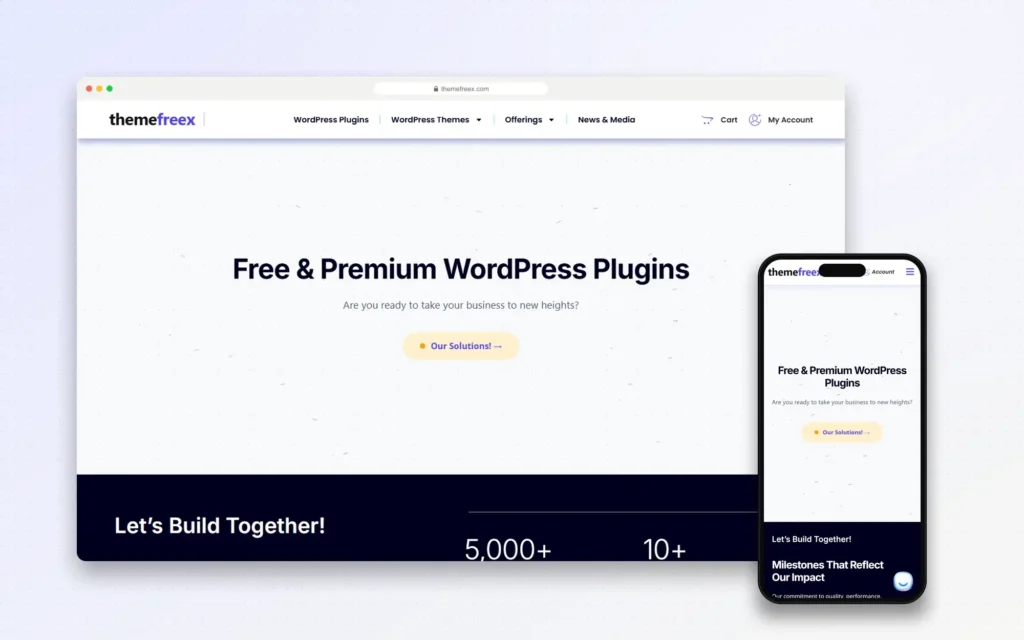
ThemeFreex
Codefreex built ThemeFreex, its own store of free and premium WordPress plugins and themes. The range covers BackupFlow for backups and migrations, Agency OS AI for…
View full case studyClient stories
Hear it from our clients
Real founders and teams on what it is like to build with Codefreex.


FAQ
WordPress Theme Development: FAQs
Straight answers to what buyers ask us most. Still unsure? Book a free 30-minute call.
How much does custom WordPress theme development cost?
Cost depends on the number of unique templates, the size of the pattern library, how many custom blocks you need, WooCommerce and multilingual requirements, and whether we migrate content from a page builder. A finished Figma design reduces the work. Codefreex scopes each theme project after a free 30-minute call and sends a written estimate before anything is built.
How long does it take to build a custom WordPress theme?
Most custom block themes go from approved design to launch within a few weeks. Large page builder migrations, extensive custom blocks or themes headed for WordPress.org or ThemeForest review take longer. We build on a staging site, so your current site stays live throughout, and we agree on a timeline once the template and content inventory is clear.
What is a block theme in WordPress?
A block theme is a WordPress theme built entirely from blocks. Templates and template parts are HTML files made of blocks, and a theme.json file defines colors, typography, spacing and editor settings. That means headers, footers and every template can be edited in the Site Editor, and design changes apply site-wide instead of page by page.
Should we move our site off Elementor or Divi?
Move if your site is slow, hard to edit consistently or expensive to maintain because of the builder. Native block themes ship far less code, which usually improves Core Web Vitals and editing speed. If your builder site is fast, well structured and your team is productive, a migration may not be worth it yet. We audit first and give you an honest recommendation.
Will a custom theme improve my site speed?
Usually, yes. A custom block theme loads only the styles and scripts your pages use, avoids builder wrappers and lets us control fonts, images and scripts precisely. Speed also depends on hosting, plugins and third-party scripts, so we review those during the audit. We measure Core Web Vitals before and after, so you see the change on your real templates.
Can you make our theme WooCommerce compatible?
Yes. We build shop, product, cart, checkout and account templates with WooCommerce blocks, style them to match your brand and test them with the payment, shipping and subscription extensions you use. We also test against new WooCommerce releases before you update, so template changes in WooCommerce do not break your store’s layout.
Do you build child themes for existing themes?
Yes. If you are happy with an existing parent theme, a child theme is the safest way to customize it. Your template overrides, styles and functions live in the child theme, so parent theme updates do not wipe out your changes. For block themes, we can also adjust theme.json and patterns in a child theme without editing the parent.
Can you build a theme for WordPress.org or ThemeForest?
Yes. We build themes that meet WordPress.org theme review requirements and ThemeForest’s quality standards, including GPL-compatible licensing, escaped output, translation readiness, Theme Check compliance, accessibility and documentation. Codefreex also runs ThemeFreex, its own store of WordPress themes and plugins, so we understand the release, support and update cycle that follows a theme launch.
Free estimate
Build a theme that keeps WordPress fast
Share your design or current site. We’ll audit it and recommend the right theme approach, free.
- A senior strategist reviews your request, not a sales bot
- Clear scope, timeline and estimate within one business day
- Free 30-minute discovery call, no obligation
- NDA available on request
- Emailhello@codefreex.com
- CallUSA +1 (209) 375-3475 · India +91 790 3375 530
- Prefer to talk?Book a 30-minute call
Keep exploring
Related services
WordPress Development
We build fast, secure WordPress sites with custom themes and plugins your team can update without code, structured for search and designed to turn visitors into leads.
ExploreWordPress Plugin Development
Custom plugins, Gutenberg blocks, WooCommerce extensions and integrations, written to WordPress coding standards, secured properly and built to stay fast as your site grows.
ExploreSpeed Optimization
We find what slows your WordPress, Shopify or custom site, fix LCP, INP and CLS at the source, and keep pages fast after every new app, plugin and campaign.
Explore