
Webflow development
Webflow Development Services for Sites Your Team Can Edit
We turn Figma designs into fast, pixel-accurate Webflow sites with structured CMS collections, smooth interactions and SEO built in, so marketing can publish without waiting on developers.
Quick answer
What do Codefreex’s Webflow development services include?
Codefreex Webflow development services include Figma to Webflow builds, Webflow CMS and collection setup, interactions and animations, Webflow Ecommerce, localization, member areas through tools like Memberstack, technical SEO and schema, and migrations from WordPress or Wix. Every site uses reusable components your marketing team can edit safely, and we train your team before handover.
540+
Projects delivered
9+
Years in business
23+
Certified experts




Trusted by 540+ growing businesses worldwide











Webflow Development
Webflow is only as good as the build behind it
- 540+projects delivered
- 9+years in business
- 23+certified experts
A senior strategist replies within one business day.
Webflow gives marketing teams a visual editor, managed hosting and clean code, so it is easy to see why so many companies move there. But a beautiful design file does not guarantee a site you can live with. Without a class system, the Designer fills up with one-off styles. Without a planned CMS, every new page needs a developer, and every edit risks breaking a layout.
Codefreex builds Webflow sites with structure. We translate your Figma design into a consistent class system, reusable components with editable properties and CMS collections modeled around your content, from blog posts and case studies to team members and locations. Interactions are smooth but light on performance, and technical SEO is configured before launch. The result is a site your team can update daily without calling a developer.
What you get
Webflow services we deliver
From a single landing page to a multi-language marketing site, every build is structured for speed, search and easy editing.
Figma to Webflow Builds
Pixel-accurate builds from your Figma files using a consistent class naming system such as Client-First, responsive layouts for every breakpoint and clean semantic HTML that stays easy to maintain.
Webflow CMS and Collections
Collections, reference and multi-reference fields modeled around your content, with dynamic templates and filtered collection lists, so new pages, posts and listings publish without a developer.
Interactions and Animations
Scroll effects, page transitions and micro-interactions built with Webflow Interactions and GSAP, tuned for performance and reduced-motion settings so the site feels polished without slowing down.
Webflow Ecommerce
Product catalogs, custom product and checkout templates, and Stripe or PayPal payments for focused stores, with an honest recommendation for Shopify when your catalog or operations outgrow Webflow.
Localization and Member Areas
Multi-language sites with Webflow Localization, localized CMS content and SEO tags, plus logins, gated content and paid memberships through Memberstack or Outseta, connected to your CMS and payments.
Webflow SEO and Schema
Clean URL structures, 301 redirects, meta fields bound to CMS data, JSON-LD schema on every template, Open Graph tags and optimized images, so your site is ready to rank on launch day.
Platforms and tools we work with
How we work
How we build your Webflow site
Clear phases, a named owner for every deliverable and weekly progress you can see.
Plan Structure and CMS
We review your design, content and goals, then plan the sitemap, class system, components and CMS collections so the site scales cleanly as content grows.
Design or Refine in Figma
We design new pages in Figma or audit your existing files for responsive states, components and accessibility, so development starts from a complete, approved design.
Build, Integrate and Test
We build in Webflow, connect forms, CRM and analytics, add interactions and SEO settings, then test every breakpoint and browser on the staging domain.
Launch and Train
We set redirects, connect your domain, publish and monitor Search Console, then train your editors and support the site with updates and new pages.
Who it is for
Who we build Webflow sites for
SaaS and tech companies
Marketing teams that ship landing pages, feature pages and blog content every week and need to publish without waiting for engineering sprints.
Agencies and studios
Creative teams that design in Figma and need a development partner to build pixel-accurate, client-editable Webflow sites under their brand.
Professional services firms
Consultancies, law firms and finance firms that want a polished site with case studies, team profiles and insights managed through the CMS.
Companies leaving WordPress or Wix
Businesses tired of plugin updates or template limits that want a faster, easier site without losing their content or search rankings.
Why teams switch to us
Structured Webflow builds vs. quick ones
Typical agency
- One-off classes that break on every edit
- Static pages that need a developer to update
- Heavy animations that slow every page
- Migrations that lose URLs and rankings
 Codefreex
- A consistent class system and reusable components
- CMS collections your editors manage themselves
- Light interactions with reduced-motion support
- Every URL mapped and redirected before launch
Buyer guide
Webflow development: a buyer’s guide
Webflow can be the best home for a marketing site or an expensive detour. Here is what a proper build includes, how Webflow compares with WordPress, and what drives cost.
What a professional Webflow build includes
A professional Webflow build starts before anyone opens the Designer. We review the Figma file for consistency, define a class naming system, set up variables for colors, typography and spacing, and plan the CMS structure. Variables and a framework such as Client-First keep styles consistent across hundreds of pages, so the site does not collapse into a tangle of one-off classes as your team adds content over time.
The build itself covers responsive layouts for every breakpoint, Webflow components with properties so editors can swap text, images and links without touching structure, CMS templates for every content type and interactions that respect reduced-motion settings. Before launch we configure forms and their integrations, redirects, SEO settings, analytics, cookie consent and site search. Finally, we train your editors and hand over a short guide to managing the site.
Webflow vs WordPress: which should you choose?
Webflow suits marketing sites where design quality and editing speed matter most. Hosting, security updates, SSL and CDN delivery are managed for you, so there are no plugins to patch or servers to maintain. The visual Designer produces clean markup, and editors work directly on the page. The trade-offs are plan-based pricing, CMS item and locale limits that depend on your plan, and a smaller integration ecosystem than WordPress offers.
WordPress wins when you need deep customization, complex membership or ecommerce logic, very large content libraries or full control over hosting and data. Its plugin ecosystem covers almost anything, but plugins also need updates, compatibility checks and security monitoring. If your site is mainly a marketing and content engine run by a small team, Webflow is often the better fit. If it is a platform with complex functionality, WordPress or a custom build usually wins.
CMS, Ecommerce and membership limits to plan for
The Webflow CMS is excellent for structured content, but it rewards planning. Collections, fields and references should mirror how your content relates, such as authors to articles or services to locations. Plans cap CMS items, and Webflow limits collection lists per page and nested references, so large directories, programmatic pages or heavy filtering need careful modeling, tools like Finsweet Attributes, or an external data source synced through the Webflow Data API.
Webflow Ecommerce works well for small, design-led catalogs with simple shipping and Stripe or PayPal payments. It is less suited to subscriptions, complex variants, multi-currency selling or large catalogs, where Shopify is usually the better platform, and as a Shopify Partner we will say so. For logins, gated content and paid memberships, most Webflow sites now rely on Memberstack or Outseta, which we connect to your CMS, forms and payments.
Migrating from WordPress or Wix to Webflow
A migration is a rebuild with an SEO safety net, not a copy and paste. Webflow cannot import WordPress themes or Wix pages directly, so we rebuild the design in Webflow and move content through CSV imports or the Webflow Data API. Blog posts, case studies and other repeatable content map into CMS collections, with authors, categories and images preserved and rich text cleaned of old shortcodes and inline styles.
Protecting rankings is the part most migrations get wrong. We crawl the old site first, map every URL to its new address, set up 301 redirects in Webflow and carry over titles, meta descriptions, headings and structured data. Forms, integrations, analytics and tracking scripts are tested on the webflow.io staging domain before the switch. After launch we monitor Google Search Console for crawl errors and ranking changes.
What drives Webflow development cost and timeline
Cost depends on the number of unique page templates, the depth of the CMS, the complexity of interactions, and whether you need ecommerce, localization or member areas. Integrations with HubSpot, Salesforce or custom APIs add work, as do migrations with large content libraries. Design is a separate factor: building from a finished Figma file is faster than designing and developing together. Webflow plan fees are billed separately by Webflow.
Most marketing sites move from approved design to launch within a few weeks, while larger sites with many templates, languages or migrated content take longer. Delays usually come from late content, unclear approval rounds and design changes after development starts, not the build itself. Codefreex scopes each Webflow project on a free 30-minute call and sends a written estimate before work begins, so you know exactly what is included.
Selected work
Proof from real projects
 +34.2% Google organic sessions, June 2026 vs May
Law by Design – Web Design, Social Media and SEO
Codefreex handles web design, social media and SEO for Law by Design. The team designed and built the…
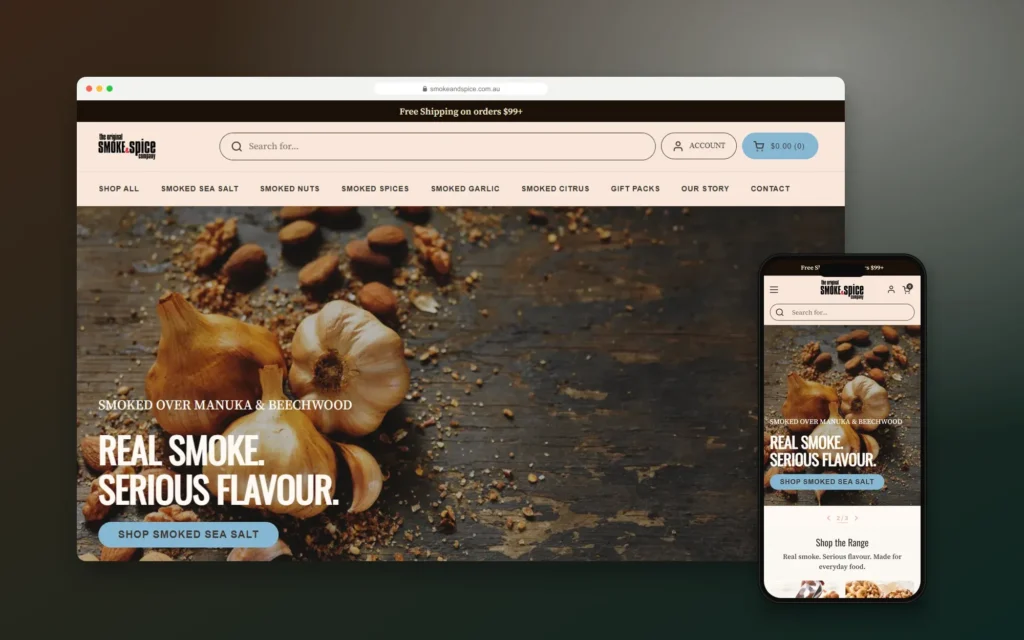
Smoke & Spice – Mobile-First Shopify Store for a Sydney Smoked Foods Brand
Codefreex designed and built a mobile-first Shopify store for The Original Smoke & Spice Company, a family business…

Elevate by She Is Elevated – Luxury Wellness Event Website for Women Leaders
Codefreex designed and built the website for Elevate by She Is Elevated, a one-day luxury reset for executives,…
Client stories
Hear it from our clients
Real founders and teams on what it is like to build with Codefreex.


FAQ
Webflow Development: FAQs
Straight answers to what buyers ask us most. Still unsure? Book a free 30-minute call.
How much does Webflow development cost?
Webflow development cost depends on the number of unique templates, CMS complexity, interactions, integrations and whether you need ecommerce, localization or member areas. Migrating a large content library also adds work, and Webflow’s own plan fees are billed separately. Codefreex scopes each project on a free 30-minute call and sends a written estimate that lists exactly what is included.
How long does it take to build a Webflow site?
Most marketing sites move from approved design to launch within a few weeks. Larger sites with many templates, multiple languages, ecommerce or a big content migration take longer. Content readiness and approval speed affect timing more than the build itself, so we agree on a content plan and review schedule at the start of every project.
Is Webflow better than WordPress?
Webflow is often better for marketing sites where design quality, editing speed and low maintenance matter most, because hosting and security are managed for you. WordPress is better for complex functionality, large ecommerce, advanced memberships or full control over hosting. Codefreex builds on both, so we recommend the platform that fits your goals rather than the one we prefer to sell.
Can you convert our Figma design to Webflow?
Yes. Figma to Webflow is our most common Webflow project. We build from your files with a consistent class system, responsive layouts for every breakpoint and reusable components, and we flag missing states such as mobile menus or empty CMS lists before development starts. The finished site matches your design closely and stays easy for your team to edit.
Can you migrate our WordPress or Wix site to Webflow?
Yes. We rebuild the design in Webflow, move posts and other repeatable content into CMS collections through CSV or the Webflow Data API, and map every old URL to a 301 redirect. Titles, meta descriptions and structured data carry over. After launch we monitor Google Search Console so any crawl errors or ranking changes are fixed quickly.
Is Webflow good for SEO?
Yes, when the site is built properly. Webflow offers clean code, fast hosting, automatic sitemaps and full control over titles, meta descriptions, alt text, canonical tags and 301 redirects. We bind SEO fields to CMS data, add JSON-LD schema to templates and keep interactions light so Core Web Vitals stay healthy. Content and links still drive rankings, and our SEO team can help there too.
Can our team edit the site without breaking it?
Yes. We build with components that expose only the properties editors should change, such as headings, images and links, and we put repeatable content in CMS collections. Editors update content directly on the page while layouts stay protected. We train your team before handover and provide a short guide for common tasks like adding posts and landing pages.
Do you offer Webflow support after launch?
Yes. Our support plans cover new pages and templates, CMS changes, interaction updates, integration fixes and ongoing SEO checks. Webflow handles hosting and platform updates, so support time goes into improving the site rather than patching it. Many clients use a monthly block of hours for landing pages and campaign updates their team does not have time to build.
Free estimate
Get a Webflow site your team loves editing
Share your Figma file or current site. We’ll scope the build and send you a free estimate.
- A senior strategist reviews your request, not a sales bot
- Clear scope, timeline and estimate within one business day
- Free 30-minute discovery call, no obligation
- NDA available on request
- Emailhello@codefreex.com
- CallUSA +1 (209) 375-3475 · India +91 790 3375 530
- Prefer to talk?Book a 30-minute call
Keep exploring
Related services
UI/UX Design
Codefreex designs websites, stores and apps around real user research, then hands developers pixel-perfect Figma files, so the product people use matches the one you approved.
ExploreWebsite Migration
Moving from Wix, Squarespace, WordPress, Magento or a custom CMS? Codefreex manages the whole migration on staging, protects your rankings and cuts over with zero downtime.
ExploreSEO
Technical fixes, on-page optimization, local SEO and content built around what your buyers search for, with reporting tied to leads and sales rather than vanity rankings.
Explore