
Email deliverability
Email Deliverability Services Built to Reach the Primary Inbox
We set up sending domains and mailboxes, configure SPF, DKIM and DMARC, warm up inboxes, test inbox placement and fix blacklist problems, so your outreach reaches the people you wrote it for.
Quick answer
What are Codefreex email deliverability services?
Codefreex email deliverability services set up and protect the foundation behind your email. Codefreex configures sending domains and Google Workspace or Microsoft 365 mailboxes, publishes SPF, DKIM and DMARC records, warms up new inboxes, runs inbox placement tests, monitors sender reputation and blocklists, and leads recovery when a domain or IP is listed, for cold outreach and marketing email.
540+
Projects delivered
9+
Years in business
23+
Certified experts





Trusted by 540+ growing businesses worldwide











Email Deliverability
Great emails don’t matter if they land in spam
- 540+projects delivered
- 9+years in business
- 23+certified experts
A senior strategist replies within one business day.
Most deliverability problems stay invisible until they are expensive. Reply rates drift down, a few prospects mention finding you in spam, and then a whole campaign stalls. The causes are usually technical and fixable: a missing or broken DMARC record, an SPF record over its lookup limit, new domains sending too much too soon, unverified lists full of bounces or a blocklist entry nobody noticed. Mailbox providers have also raised the bar, so habits that worked a few years ago now hurt.
Codefreex fixes the foundation first, then keeps it healthy. We audit your domains, DNS and sending patterns, set up dedicated outreach domains that protect your main brand, configure authentication correctly and warm up every mailbox before it sends. Ongoing monitoring covers inbox placement, bounce and complaint signals, Google Postmaster Tools and blocklists, so problems are caught early. The same team runs Codefreex cold email programs, so our advice comes from live outreach, not theory.
What you get
What our deliverability work covers
Everything between pressing send and reaching the inbox: domains, authentication, warm-up, list quality, monitoring and recovery.
Deliverability Audit
We review DNS records, domain age and history, sending volumes, list sources, bounce and complaint data and content patterns, then give you a prioritized list of what is hurting inbox placement.
Domain and Mailbox Setup
We register outreach domains that protect your main brand, set up Google Workspace or Microsoft 365 mailboxes, redirects and custom tracking domains, and keep volume per mailbox conservative.
SPF, DKIM and DMARC
We publish and align SPF, DKIM and DMARC records, fix lookup and alignment errors, read DMARC reports and move your policy toward enforcement without blocking legitimate mail.
Mailbox Warm-Up
New and recovering mailboxes build reputation gradually with warm-up tools and real engagement before campaigns start, then volume rises in measured steps based on placement data.
Inbox Placement Monitoring
Seed tests and Google Postmaster Tools show where your mail lands across Gmail, Outlook and other providers, with alerts when placement, bounce rates or spam complaints change.
Blacklist Recovery
When a domain or IP is listed, we find the cause, fix it, follow each blocklist’s removal process and adjust your sending so the same problem does not come back.
Platforms and tools we work with
How we work
How we fix and protect your deliverability
Clear phases, a named owner for every deliverable and weekly progress you can see.
Audit
We check DNS records, domain history, sending platforms, volumes, list sources, bounce and complaint data and blocklist status, then share a prioritized list of fixes.
Setup and authentication
We set up outreach domains and mailboxes, publish and align SPF, DKIM and DMARC, configure tracking domains and connect your sending tools correctly.
Warm-up and controlled ramp
Mailboxes warm up before any campaign sends, then volume increases in measured steps while we watch placement, bounces and replies across the major providers.
Monitor and recover
Ongoing monitoring covers placement tests, Google Postmaster Tools, DMARC reports and blocklists, with fast action and a clear recovery plan when something changes.
Who it is for
Who needs deliverability help
Teams launching cold email
Companies starting outbound that want domains, mailboxes and authentication set up correctly before the first campaign reaches a prospect.
Campaigns landing in spam
Outreach or newsletters whose replies and clicks have dropped suddenly, where the cause needs to be found and fixed fast.
Domains on a blocklist
Businesses whose domain or IP has been listed, blocking invoices, support replies and sales emails along with marketing campaigns.
Growing sending programs
Sales and marketing teams adding tools, mailboxes and volume that need authentication and reputation kept in order as they scale.
Why teams switch to us
Deliverability done right vs quick fixes
Typical agency
- Cold email sent from your main domain
- DNS records copied without checking alignment
- Warm-up treated as a cure-all
- Blocklists noticed only after replies stop
 Codefreex
- Separate outreach domains that protect your brand
- SPF, DKIM and DMARC aligned and enforced
- Clean data, sensible volume and real warm-up
- Continuous monitoring with a recovery plan ready
Buyer guide
Email deliverability: a buyer’s guide
Deliverability decides whether anyone reads the emails you worked hard to write. Here is how inbox placement works, what to set up, how to warm up and recover, and what to expect from a provider.
How inbox placement works
Deliverability is not the same as delivery. An email is delivered when the receiving server accepts it, but it may still land in spam, a promotions tab or a quarantine folder. Mailbox providers such as Gmail and Outlook decide placement using several signals together: whether the message is properly authenticated, the reputation of the sending domain and IP, how recipients engage with your mail, how many addresses bounce and how often people mark messages as spam.
Reputation is earned slowly and lost quickly. A new domain has no history, so it must build trust with low, steady volume. Sudden spikes, poor-quality lists or complaints damage that trust, and recovery takes weeks. Major providers, including Gmail, Yahoo and Outlook.com, have tightened their requirements for bulk senders, asking for authentication, easy unsubscribes and low complaint rates. Cold email is judged by the same systems, so technical discipline matters even at modest volumes.
SPF, DKIM and DMARC explained
SPF lists the servers allowed to send email for your domain. DKIM adds a cryptographic signature that proves a message was not altered and really came from you. DMARC ties the two to the visible From address, tells receivers what to do with mail that fails and sends you reports on who is sending as your domain. Together they prove to mailbox providers that your mail is legitimate and make your domain much harder to spoof.
Small mistakes break them. SPF has a limit of ten DNS lookups, so stacking every tool’s include can cause it to fail. DKIM must be enabled for each sending service, not just your main mailbox provider. DMARC should start at a monitoring policy of p=none, then move to quarantine and reject once reports confirm every legitimate sender passes. With DMARC enforced, you can also consider BIMI, which lets supporting inboxes display your logo beside your messages.
Domains, mailboxes and warm-up for cold email
Cold outreach should not run from your main company domain. If something goes wrong, the damage reaches invoices, support replies and every email your team sends. Instead, outreach usually runs from a few secondary domains that clearly belong to your brand, each with its own authenticated mailboxes on Google Workspace or Microsoft 365, a redirect to your main website and a custom tracking domain if you track clicks. Spreading volume across mailboxes keeps each one at a modest, natural level.
Every new mailbox needs warm-up before campaigns begin. Warm-up tools send and receive emails between real inboxes, open them, reply and move them out of spam, which builds a positive history. This normally takes a few weeks, and campaign volume should then rise gradually rather than jump. Warm-up is not a cure for bad lists or spammy copy, though. Verified data, relevant targeting and plain, personal messages do more for reputation over time than any warm-up tool.
Blacklists, bounces and recovery
Blocklists, also called blacklists, are databases that mailbox providers and spam filters check before accepting mail. Spamhaus, Barracuda and SpamCop are among the best known. Listings usually follow a specific trigger: hitting spam trap addresses, a burst of complaints, a compromised account sending spam or high bounce rates from an old list. Some listings expire on their own once the problem stops, while others require a removal request through the blocklist’s own process.
Recovery starts with finding and fixing the cause, because requesting removal while the problem continues usually fails or leads to relisting. That means pausing affected campaigns, verifying or cleaning lists, checking for compromised accounts and reviewing what changed before the listing. Only then do we submit removal requests and rebuild volume slowly. No honest provider can promise delisting by a set date, since each blocklist operator makes its own decision.
Compliance, cost and choosing a provider
Technical setup and legal compliance go together. Every commercial email should identify the sender accurately, include a working opt-out and honor unsubscribes promptly, in line with laws such as CAN-SPAM in the US, GDPR and PECR in the EU and UK, and CASL in Canada. Rules differ by country and by whether you email businesses or consumers, so match your process to where recipients are and have your legal team approve it. Good compliance also lowers complaints, which protects reputation.
Deliverability cost depends on how many domains and mailboxes are involved, whether you need a one-time setup or ongoing monitoring, the sending platforms in use and whether there is an active blocklist or reputation problem to fix. Codefreex scopes the work after a free 30-minute discovery call and sends a written estimate within one business day. When comparing providers, ask what they monitor, how they report placement and how they handle a listing. Avoid anyone guaranteeing inbox rates.
Selected work
Proof from real projects
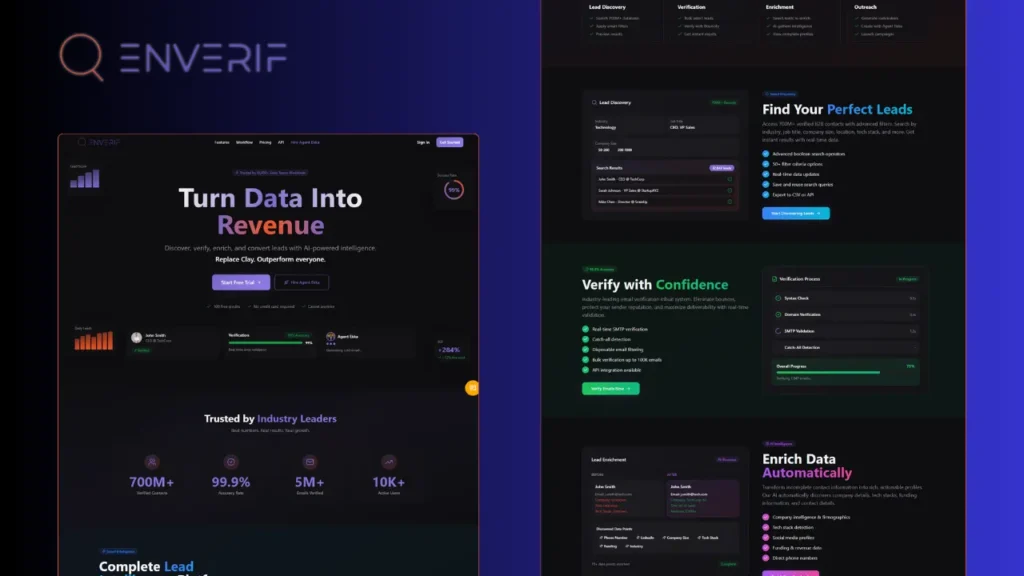
Enverif
Codefreex built Enverif, an AI-powered lead intelligence platform for B2B sales teams. It combines 700M+ verified contacts, real-time email verification with 99.9% accuracy, AI enrichment that…
Client stories
Hear it from our clients
Real founders and teams on what it is like to build with Codefreex.


FAQ
Email Deliverability: FAQs
Straight answers to what buyers ask us most. Still unsure? Book a free 30-minute call.
What do email deliverability services include?
Email deliverability services cover everything that affects whether your email reaches the inbox. At Codefreex that means a deliverability audit, domain and mailbox setup, SPF, DKIM and DMARC configuration, mailbox warm-up, list verification guidance, inbox placement testing, reputation and blocklist monitoring, and recovery when something goes wrong. We can handle a one-time setup or monitor your sending on an ongoing basis.
How much do email deliverability services cost?
Email deliverability cost depends on the number of domains and mailboxes, whether you need a one-time setup or ongoing monitoring, the sending tools involved and whether an active reputation or blocklist problem needs fixing. Mailbox, warm-up and testing tools are billed by their vendors. Codefreex scopes the work after a free 30-minute discovery call and sends a written estimate within one business day.
Why are my cold emails going to spam?
Cold emails usually land in spam because of missing or misaligned authentication, a new domain sending too much too soon, high bounce rates from unverified lists, spam complaints, or content and links that look like bulk mail. A blocklist entry can also be the cause. A deliverability audit checks each factor, finds the real reason and gives you a prioritized list of fixes.
Should I send cold email from my main domain?
No, cold outreach should run from separate domains that clearly belong to your brand. If an outreach campaign damages reputation, your main domain’s invoices, support replies and team email stay protected. Each outreach domain gets its own authenticated mailboxes, a redirect to your website and careful warm-up. Customer, transactional and newsletter email can stay on your main domain.
How long does it take to warm up a new email domain?
Warming up a new domain and its mailboxes usually takes a few weeks before campaigns start. Volume should then rise gradually while placement, bounces and replies are monitored, rather than jumping to full capacity. Domains with a damaged reputation take longer to recover. We set the pace based on placement test results and mailbox provider data, not on a fixed calendar.
Do I need DMARC, and which policy should I use?
Yes, every sending domain should have DMARC, and major mailbox providers now require it from bulk senders. Start with a monitoring policy of p=none and read the reports to confirm every legitimate service passes SPF or DKIM in alignment. Then move to quarantine and finally reject, which blocks spoofed mail that uses your domain. Codefreex manages each stage and the reporting between them.
Can you get my domain removed from a blacklist?
Yes, we lead the full recovery process, though no one can guarantee removal by a set date. We identify which blocklists list you, find and fix the cause, such as spam traps, complaints or a compromised account, then follow each list’s removal procedure and rebuild sending slowly. Some listings expire once the problem stops, while others need a formal request.
Does good deliverability keep my outreach compliant?
Not on its own, but the two support each other. Compliance with laws such as CAN-SPAM, GDPR, PECR and CASL depends on accurate sender details, a clear opt-out, prompt handling of unsubscribes and a lawful reason to email each recipient. Those same practices reduce spam complaints and protect your reputation. We build them into every setup, and your legal team should approve your approach.
Free estimate
Find out why your emails miss the inbox
Book a free 30-minute call. We’ll review your domains, DNS and sending setup and show you what to fix first.
- A senior strategist reviews your request, not a sales bot
- Clear scope, timeline and estimate within one business day
- Free 30-minute discovery call, no obligation
- NDA available on request
- Emailhello@codefreex.com
- CallUSA +1 (209) 375-3475 · India +91 790 3375 530
- Prefer to talk?Book a 30-minute call
Keep exploring
Related services
Cold Email Marketing
A fully managed B2B outreach service from Codefreex: we define your ideal customer, build verified lists, write personalized sequences, protect deliverability and turn positive replies into booked meetings.
ExploreEmail Marketing
Lifecycle flows, campaigns and segmentation built in Klaviyo by a Klaviyo Partner team, designed to recover lost sales and bring customers back for their next order.
ExploreMarketing Automation
We connect lead capture, scoring, nurture flows and lifecycle email and SMS to your CRM, using HubSpot, Klaviyo, Salesforce, Zoho, Make, Zapier or n8n, so every lead gets timely follow-up.
Explore