
Shopify theme development
Shopify Theme Development That Fits Your Brand and Loads Fast
We build custom Online Store 2.0 themes from your Figma designs and customize Dawn or premium themes, with flexible sections, clean Liquid and pages built to pass Core Web Vitals.
Quick answer
What do Codefreex’s Shopify theme development services include?
Codefreex Shopify theme development services include custom Online Store 2.0 themes built from Figma designs, customization of Dawn, Horizon and premium themes, new sections and blocks, metafield and metaobject templates, speed and accessibility fixes, and vintage theme migrations. As a Shopify Partner, Codefreex writes clean Liquid and builds sections your team can manage without a developer.
540+
Projects delivered
9+
Years in business
23+
Certified experts




Trusted by 540+ growing businesses worldwide












Shopify Theme Development
Your theme decides how your store sells
- 540+projects delivered
- 9+years in business
- 23+certified experts
A senior strategist replies within one business day.
Your theme is the part of Shopify your customers actually see. It controls how fast pages load, how products are presented and how many taps it takes to reach checkout. A cluttered theme stacked with app scripts and leftover code slows the store and turns every promotion into a developer ticket. A well-built theme does the opposite: it loads quickly, looks like your brand and lets your team launch pages alone.
Codefreex builds Shopify themes on Online Store 2.0, with JSON templates, sections and blocks on every page and content pulled from metafields and metaobjects. We code custom themes from Figma for brands that need a distinct look, and we customize Dawn, Horizon or premium themes when speed to market matters more. Either way you get tidy Liquid, a lean app stack and a theme editor your team understands.
What you get
Shopify theme services we offer
From a full custom build to a single new section, every theme project is built for speed, easy editing and conversion.
Custom Themes From Figma
We turn your Figma designs into a custom Online Store 2.0 theme, coded from a clean base with reusable sections, theme blocks and settings that match your brand system.
Theme Customization
We extend Dawn, Horizon or a premium Theme Store theme with new sections, layouts and features, keeping changes organized so the theme stays easy to maintain and update.
Metafields and Metaobjects
Size guides, ingredients, specs, FAQs and lookbooks stored as metafields and metaobjects and connected to sections through dynamic sources, so content stays structured and editable without code.
Online Store 2.0 Migration
Vintage themes are rebuilt on Online Store 2.0 with JSON templates and sections everywhere, so you gain app blocks, flexible page layouts and a theme editor that works on every page.
Speed and Core Web Vitals
We cut render-blocking scripts, unused app code and oversized images, use responsive image filters and lazy loading, and test LCP, INP and CLS on real mobile devices.
Accessible Theme Code
Semantic markup, keyboard navigation, visible focus states, color contrast and alt text built to WCAG 2.1 AA guidance, so more shoppers can browse, compare and buy.
Platforms and tools we work with
How we work
From theme audit to a published theme
Clear phases, a named owner for every deliverable and weekly progress you can see.
Audit and scope
We review your current theme, apps, speed and analytics, then list the templates, sections and integrations you need. You get a written scope and estimate before work begins.
Design in Figma
Key templates are designed mobile-first in Figma, including home, collection, product and cart. You approve layouts and interactions before a line of Liquid is written.
Develop and test
We code the theme in an unpublished copy using Shopify CLI and GitHub, connect metafields and apps, and test speed, accessibility and checkout paths across devices.
Publish and support
We publish without downtime, train your team on the theme editor and stay on hand for new sections, seasonal campaigns and improvements once real shopper data arrives.
Who it is for
Stores that need theme development
Brands with a distinct identity
Brands whose look cannot fit a stock theme and need a custom theme coded from their own Figma designs and design system.
Stores on vintage themes
Merchants still on pre-2.0 themes who want sections everywhere, app blocks and a theme editor that works on every page.
Complex catalogs
Stores with bundles, variants, swatches, size guides or technical specs that need metafield-driven product pages built to explain and sell.
Slow or bloated stores
Stores whose theme has collected years of app code and quick edits, and now needs a cleanup or rebuild to load fast on mobile.
Why teams switch to us
What a Shopify Partner theme build looks like
Typical agency
- Hardcoded pages only a developer can change
- App scripts piled into theme.liquid
- Premium theme hacked until it cannot update
- Speed tested on desktop only
 Codefreex
- Sections and blocks your team edits freely
- App blocks that load only where needed
- Clean custom code or documented customizations
- LCP, INP and CLS tested on real phones
Buyer guide
Shopify theme development: a buyer’s guide
Before you commission a Shopify theme, it helps to know how Online Store 2.0 works, when a custom build is worth it and which factors shape the cost and timeline.
What Online Store 2.0 changed for themes
Online Store 2.0 replaced fixed Liquid templates with JSON templates. Each template is a list of sections that merchants can add, remove and reorder in the theme editor, on every page type rather than only the home page. Sections hold blocks, and theme blocks can now be nested and reused across sections, so one well-designed block can serve product, collection and landing pages alike. Section groups do the same job for headers and footers.
The other big change is dynamic content. Metafields store extra data on products, collections, customers and more, while metaobjects store structured entries such as designers, ingredients or store locations. Sections connect to both through dynamic sources, and metaobjects can even have their own web pages. Apps plug in through app blocks instead of editing theme files. If your store still runs a vintage theme, you are missing all of this, and a 2.0 migration is usually the first step.
Custom theme vs customizing Dawn or a premium theme
Shopify’s free themes, such as Dawn and the newer Horizon family, are fast, accessible and maintained by Shopify. Premium themes from the Theme Store add more layouts and built-in features. Customizing one of these is the quickest route to launch and suits brands with a standard catalog, good photography and a modest budget. The trade-off is that heavy customization of a premium theme makes vendor updates harder to apply, and you inherit features and code you may never use.
A custom theme is coded around your design system and catalog, with only the sections you need. It suits brands with a distinctive visual identity, complex products such as bundles, configurators or wholesale pricing, or performance targets a general-purpose theme cannot meet. It costs more up front but is usually lighter, easier to extend and fully yours. Many brands take a middle path: a lean starter base such as Dawn, with custom sections built on top.
What affects the cost of a Shopify theme
Scope is the main driver: the number of unique templates, how many custom sections and blocks you need, and how much of the design is bespoke. A store with home, collection, product, cart and a few content pages is a very different job from one with lookbooks, bundle builders, store locators and region-specific content. Complex product logic, such as variant images, swatches driven by metafields or subscription options, adds development and testing time.
Other factors include whether designs already exist in Figma, migration from a vintage theme, the number of apps that need to work with the theme, multi-language and multi-currency setups through Shopify Markets, and accessibility or performance targets. Metafield setup and content entry also take time when catalogs are large. Codefreex quotes after a free theme audit or 30-minute discovery call, with a written scope listing every template and section, so you know exactly what you are paying for.
Speed, accessibility and Theme Store standards
Theme speed is mostly decided by what loads before the shopper sees content. We keep JavaScript small and deferred, avoid heavy sliders above the fold, serve images through Shopify’s image_url and image_tag filters at the right sizes, and preload only the hero image. Apps are the usual culprit, so we audit every script, remove leftovers from uninstalled apps and prefer app blocks that load only where they are used. Then we test LCP, INP and CLS on mid-range phones, not only desktop.
Accessibility matters for shoppers and for legal risk in markets such as the US and EU. We follow WCAG 2.1 AA guidance for headings, labels, focus order, contrast and motion, and test with a keyboard and screen readers. If you plan to sell your theme on the Shopify Theme Store, the bar is higher still: Shopify reviews themes for performance, accessibility, Online Store 2.0 support, presets and code quality, and we build to those requirements from the first section.
How a theme project runs and how to choose a developer
Most theme projects follow the same path: audit or discovery, design in Figma, development in an unpublished theme, content and app setup, testing, then publishing. We work in Shopify CLI with GitHub, so every change is versioned and you can preview progress on a theme link at any time. Customizations to an existing theme often take a few weeks, while full custom themes with many templates take longer, depending mostly on design approvals and content readiness.
When choosing a developer, ask to see live stores and run them through PageSpeed Insights. Open the theme editor on a demo and check whether sections are clearly named and flexible, or whether every change still needs code. Ask how they handle app scripts, whether they use theme blocks and metaobjects, and who owns the theme files. Codefreex is a Shopify Partner, and stores we built, including Klooper, Dento Matcha and Squeezy Sports, are live for you to review.
Selected work
Proof from real projects
 $10k+ monthly revenue
Klooper.in Shopify Success Story
Codefreex built Klooper.in a conversion-focused Shopify store designed to hit revenue targets from day one. The build combined…
 400% conversion increase
Dento Matcha – Custom Shopify Website
Codefreex designed and built a custom Shopify website for Dento Matcha, a Swiss matcha brand serving customers across…
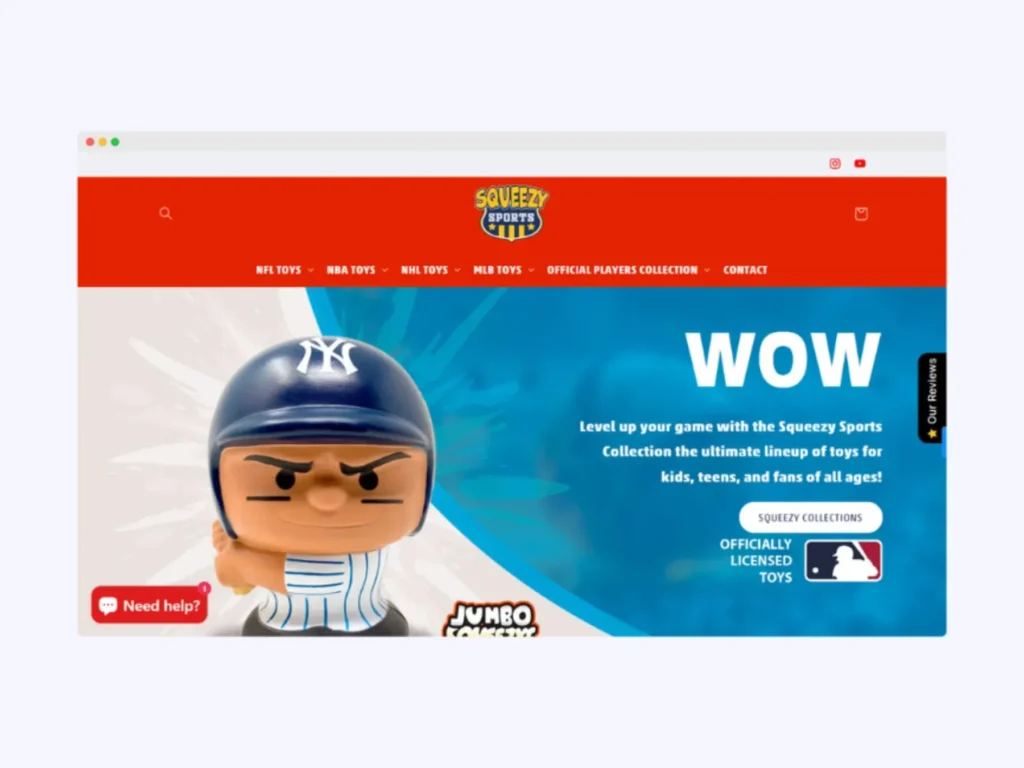
Squeezy Sports – Custom Shopify Website
Codefreex built a custom Shopify website for Squeezy Sports, a US toys and merchandise brand that had outgrown…
Client stories
Hear it from our clients
Real founders and teams on what it is like to build with Codefreex.


FAQ
Shopify Theme Development: FAQs
Straight answers to what buyers ask us most. Still unsure? Book a free 30-minute call.
How much does Shopify theme development cost?
The cost depends on whether you need an existing theme customized or a fully custom one, the number of unique templates and sections, and the complexity of your product pages. Migration from a vintage theme, multi-language setup and app integrations add scope. Codefreex offers a free theme audit or 30-minute discovery call, then sends a written estimate that lists every template and section.
How long does it take to build a custom Shopify theme?
Customizing an existing theme with new sections often takes a few weeks. A full custom theme built from Figma designs takes longer, depending on the number of templates, design rounds and how ready your content is. We share a timeline with the scope and work in an unpublished theme, so your live store keeps selling until the new theme is approved.
Should I buy a premium theme or build a custom one?
Buy a premium theme if your catalog is straightforward, your budget is tight and you want to launch quickly. Build a custom theme if your brand needs a distinct look, your products need special layouts, or a premium theme’s extra code is slowing you down. Many brands start from a lean base such as Dawn and add custom sections, which balances cost and flexibility.
What is Online Store 2.0 and does my store need it?
Online Store 2.0 is Shopify’s theme architecture. It uses JSON templates, so you can add and rearrange sections on every page, connect metafields as dynamic sources and install app blocks without editing code. Every current Shopify theme is built on it. If your store still runs a vintage theme, migrating gives your team far more control and makes app installs cleaner.
Will a new Shopify theme affect my SEO?
A new theme should help SEO rather than hurt it, as long as it is built carefully. Your URLs, products and content stay in Shopify, so rankings carry over when you switch themes. We preserve heading structure, meta fields and structured data, keep pages fast and check important templates before publishing. The speed and accessibility gains of a cleaner theme often support search performance.
Can you customize my existing Shopify theme without breaking it?
Yes. We duplicate your live theme, make changes in the copy and test them before publishing, so shoppers never see work in progress. Customizations live in clearly named sections, snippets and files, which makes future updates easier. For premium themes, we document every change so you can decide later whether to apply vendor updates or keep your customized version.
Do you build themes for the Shopify Theme Store?
Yes. We can build a theme intended for sale on the Shopify Theme Store, following Shopify’s requirements for Online Store 2.0 support, performance, accessibility, presets, settings and documentation. Theme Store review is strict, so we test against those requirements throughout development rather than at the end. We also help prepare the theme’s demo stores and listing content.
Will my team be able to edit the theme after launch?
Yes, and that is a core goal of every theme we build. Sections and blocks have clear names and sensible settings, so your team can build landing pages, change banners and launch promotions in the theme editor without code. We train your team at handover and document how each section works. For larger changes, monthly support plans are available.
Free estimate
Ready for a faster, easier Shopify theme?
Request a free theme audit. We’ll review your speed, code and editor setup and show you what to fix first.
- A senior strategist reviews your request, not a sales bot
- Clear scope, timeline and estimate within one business day
- Free 30-minute discovery call, no obligation
- NDA available on request
- Emailhello@codefreex.com
- CallUSA +1 (209) 375-3475 · India +91 790 3375 530
- Prefer to talk?Book a 30-minute call
Keep exploring
Related services
Shopify Development
From custom themes and Shopify Plus builds to headless storefronts and private apps, Codefreex builds Shopify stores that load fast, match your brand and convert more browsers.
ExploreShopify App Development
Codefreex builds public App Store apps and custom apps for single stores, using Shopify’s own stack: the React Router template, Polaris, App Bridge, Functions and checkout extensions.
ExploreSpeed Optimization
We find what slows your WordPress, Shopify or custom site, fix LCP, INP and CLS at the source, and keep pages fast after every new app, plugin and campaign.
Explore