
Cloud migration services
Cloud Migration Services That Keep Your Business Running
Codefreex moves your applications, databases and files to AWS, Microsoft Azure or Google Cloud with a thorough assessment, rehearsed cutovers, a rollback plan and cost baselines set before the first workload moves.
Quick answer
What do Codefreex’s cloud migration services include?
Codefreex cloud migration services move applications, databases and files to AWS, Microsoft Azure or Google Cloud. The work covers a migration assessment, a rehost, replatform or refactor plan for each workload, a secure landing zone, database migration with minimal downtime, rehearsed cutover and rollback, security and cost baselines, and post-migration optimization. Codefreex is an AWS Partner.
540+
Projects delivered
9+
Years in business
23+
Certified experts




Trusted by 540+ growing businesses worldwide











Cloud Migration
Most Migrations Go Wrong in the Planning, Not the Move
- 540+projects delivered
- 9+years in business
- 23+certified experts
A senior strategist replies within one business day.
Moving to the cloud sounds like a copy job. In practice, the trouble hides in what nobody wrote down: a cron job on the old server, a hard-coded IP address, a database too large to copy in one night, a license tied to hardware. Teams that skip discovery find these during cutover weekend, when every surprise costs downtime and the old environment is already half dismantled.
Codefreex plans the move before touching a server. We inventory every application, database and dependency, decide whether each workload is rehosted, replatformed or refactored, and build a secure landing zone on AWS, Microsoft Azure or Google Cloud. Databases are replicated so cutover fits a short window, every cutover is rehearsed, and a rollback path stays open until the new environment has proven itself in production.
What you get
What Our Cloud Migration Services Cover
One team handles the assessment, the landing zone, the data move and the weeks after go-live, so nothing falls between vendors.
Migration Assessment
We inventory servers, applications, databases, dependencies and licenses, measure real resource usage, and rank workloads by risk and business value, so you know what moves first, what changes and what gets retired.
Strategy for Each Workload
Rehost, replatform or refactor is decided per application, not for the whole estate. Stable legacy systems move as they are, while apps with a long future get managed databases or containers.
Landing Zone Setup
Accounts or subscriptions, networking, identity, logging and guardrails are built as Terraform code before any workload arrives, giving every application a secure, consistent place to land.
Database Migration
Continuous replication with AWS Database Migration Service, Azure Database Migration Service, Google Cloud’s Database Migration Service or native tools keeps source and target in sync, so the final switch is short.
Cutover and Rollback
Every cutover follows a written runbook rehearsed against a copy of production, with DNS changes prepared, validation checks listed and a rollback path kept open after the switch.
Post-Migration Optimization
Once real usage data exists, we rightsize instances and databases, apply commitment discounts to steady workloads, work through security findings and decommission the old environment cleanly.
Platforms and tools we work with
How we work
How a Cloud Migration Runs
Clear phases, a named owner for every deliverable and weekly progress you can see.
Assess and Plan
We inventory workloads and dependencies, measure usage, pick a strategy for each application, and deliver a wave plan with projected monthly cloud costs.
Build the Landing Zone
We set up accounts, networking, identity, logging, backups and budget alerts in Terraform, then connect the new environment to your existing one.
Migrate in Waves
We move low-risk workloads first, replicate databases, rehearse each cutover, then switch traffic in a planned window with a rollback path ready.
Stabilize and Optimize
We monitor closely after go-live, rightsize resources using real usage, apply commitment discounts, hand over documentation and decommission the old environment.
Who it is for
When Businesses Call Us About Migration
Leaving a Data Center or Aging Servers
Companies facing a hardware renewal, a colocation contract ending or unsupported operating systems that want out without rewriting every application first.
Outgrowing Shared or VPS Hosting
Growing sites and apps that need managed databases, autoscaling, proper backups and staging environments their current host cannot provide.
Moving Between Clouds
Teams consolidating on one provider after an acquisition, a pricing change or a decision to standardize on AWS, Azure or Google Cloud.
Stalled or Half-Finished Migrations
Projects where some workloads moved, others did not, and the business is now paying for two environments with no clear end date.
Why teams switch to us
A Planned Migration vs. a Weekend Lift-and-Shift
Typical agency
- Quotes a price before listing your workloads
- Lifts every server over unchanged
- Long outage while databases copy
- No way back once DNS is switched
 Codefreex
- Workload inventory and wave plan come first
- Rehost, replatform or refactor chosen per workload
- Replicated databases and a short cutover window
- Rehearsed rollback kept open until you sign off
Buyer guide
Cloud migration services: a buyer’s guide
What a migration assessment should produce, how rehost, replatform and refactor differ, how databases move with minimal downtime, what a real cutover plan contains, and what drives the cost of moving to AWS, Azure or Google Cloud.
What a cloud migration assessment should tell you
A migration starts with an inventory, not a quote. The assessment lists every server, application, database, scheduled job, file share and integration, along with who owns it and what depends on it. It records real CPU, memory, storage and network usage over a few weeks, because sizing cloud resources from the old hardware specification usually means paying for capacity nobody uses. Discovery tools such as Azure Migrate and Google Cloud Migration Center collect much of this automatically, and scripts fill the gaps.
The output should be a document you can act on: workloads grouped into migration waves, a chosen strategy for each, a target architecture, a projected monthly cloud bill and a list of risks with owners. It should also name what will not move. Retiring unused systems and keeping a few awkward ones where they are is often the cheapest decision in the whole project. If an assessment ends with a single lump-sum figure and no workload list, it has not done its job.
Rehost, replatform or refactor: choosing a strategy
AWS describes seven migration strategies, the 7 Rs: retire, retain, rehost, relocate, repurchase, replatform and refactor. Three do most of the work. Rehosting, often called lift and shift, copies servers to cloud virtual machines with tools such as AWS Application Migration Service or Azure Migrate. Replatforming makes targeted changes, like moving a self-managed MySQL or SQL Server database to a managed service, or packaging an app into containers. Refactoring rewrites parts of the application around cloud-native services.
Rehosting is fastest and least risky in the short term, but you carry over old operating systems, manual processes and oversized servers. Refactoring gives the largest long-term gain and costs the most up front. Replatforming sits in between and suits most business applications: you keep the code, but hand backups, patching and failover to the provider. We choose per workload, based on how long the application will live, how often it changes and how much downtime the business can tolerate.
Database migration with minimal downtime
Databases set the pace of most migrations, because applications can be redeployed in minutes but data has to be copied. For small databases, a dump and restore during a quiet window is simple and safe. For larger ones, we use continuous replication: a full initial copy, then change data capture that streams every new write to the target. AWS Database Migration Service, Azure Database Migration Service and Google Cloud’s Database Migration Service all work this way, as do native tools like PostgreSQL logical replication and MySQL replication.
Replication turns cutover from a long outage into a short pause. When the target has caught up, we stop writes on the source, wait for the last changes to arrive, verify row counts and checksums, and point the application at the new database. Moving between engines, for example Oracle or SQL Server to PostgreSQL, adds schema conversion and query testing and needs more time. We also test restores and performance on the target before cutover, since a database that migrated correctly can still run slowly on default settings.
Landing zone, cutover plan and rollback
A landing zone is the foundation workloads move into: the account or subscription structure, virtual networks, identity and single sign-on, centralized logging, encryption defaults, backup policies and budget alerts. Building it first, as Terraform code, means security and cost baselines exist from day one instead of being retrofitted. It also answers practical questions early, such as how the cloud network connects to your office or data center during the weeks when old and new environments run side by side.
The cutover plan is a runbook with times, owners and checks. It covers lowering DNS time-to-live values in advance, freezing changes, the final data sync, switching traffic, smoke tests and the decision point for going back. Rollback has to be real: the old environment stays intact and, where possible, data is replicated back to it until you sign off. We rehearse the full sequence against a copy of production, because a rehearsal finds the missing firewall rule while it is still cheap to fix.
Cost drivers, timelines and choosing a migration partner
Migration cost depends on the number of applications and databases, data volume, how much each workload changes, compliance requirements and how much downtime you can accept. Tighter downtime windows need replication and more rehearsal. Running old and new environments in parallel adds temporary cost, and cloud usage itself is billed separately by the provider. A single application often moves in a few weeks, while larger estates move in waves over several months. After go-live, rightsizing and commitment discounts such as Savings Plans, Azure reservations or committed use discounts bring the bill down.
When you compare partners, ask to see a sample assessment, a cutover runbook and Terraform from a past project. Confirm that every cloud account will be registered to your company and that the plan includes rollback and a period of support after cutover. Be wary of anyone who recommends a cloud before looking at your workloads. Codefreex is an AWS Partner and also migrates to Microsoft Azure and Google Cloud, with 9+ years of experience and 540+ projects delivered. We start with a free 30-minute call.
Selected work
Proof from real projects
 +34.2% Google organic sessions, June 2026 vs May
Law by Design – Web Design, Social Media and SEO
Codefreex handles web design, social media and SEO for Law by Design. The team designed and built the…
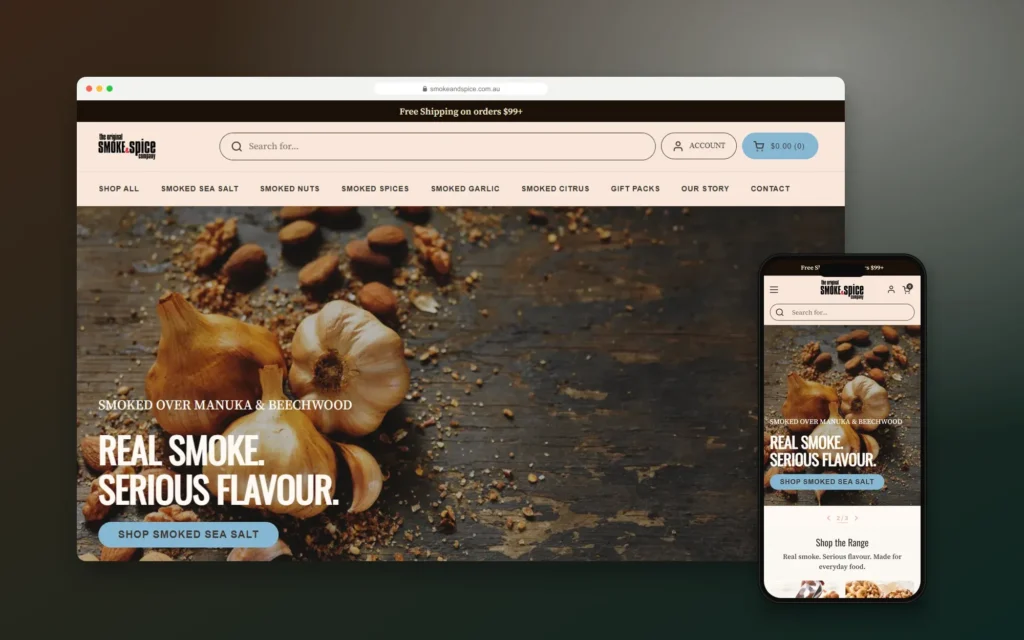
Smoke & Spice – Mobile-First Shopify Store for a Sydney Smoked Foods Brand
Codefreex designed and built a mobile-first Shopify store for The Original Smoke & Spice Company, a family business…

Elevate by She Is Elevated – Luxury Wellness Event Website for Women Leaders
Codefreex designed and built the website for Elevate by She Is Elevated, a one-day luxury reset for executives,…
Client stories
Hear it from our clients
Real founders and teams on what it is like to build with Codefreex.


FAQ
Cloud Migration: FAQs
Straight answers to what buyers ask us most. Still unsure? Book a free 30-minute call.
How much do cloud migration services cost?
Cloud migration cost depends on how many applications and databases move, the volume of data, how much each workload needs to change, your compliance requirements and how short the downtime window must be. Cloud usage is billed separately by AWS, Microsoft or Google. Codefreex scopes the project on a free 30-minute call, then sends a written estimate with projected monthly cloud costs.
How long does a cloud migration take?
A single application with one database often moves in a few weeks, including assessment, rehearsal and cutover. Larger estates with many servers, tightly coupled systems or compliance reviews move in waves over several months. Database size and how fast your team can test usually set the pace. We plan waves so each one is stable before the next begins.
Which cloud should we migrate to: AWS, Azure or Google Cloud?
It depends on your workloads, existing licenses and team skills. AWS has the broadest service catalog. Microsoft Azure often suits companies that already run Windows Server, SQL Server and Microsoft 365. Google Cloud is strong for containers, analytics with BigQuery and machine learning. Codefreex is an AWS Partner and migrates to all three, so the recommendation follows your requirements.
Will our website or application go down during the migration?
Usually only for a short, planned window. We replicate databases continuously, so the final switch involves pausing writes, syncing the last changes and redirecting traffic, which keeps the outage brief for most applications. Very large or complex systems may need a longer window. We agree the timing with you in advance and schedule it outside your busiest hours.
What is the difference between rehosting, replatforming and refactoring?
Rehosting moves servers to the cloud as they are. Replatforming keeps the application code but swaps parts for managed services, such as a managed database or containers. Refactoring rewrites parts of the application around cloud-native services. Rehosting is fastest, refactoring delivers the most long-term benefit, and replatforming balances the two. Codefreex chooses a strategy for each workload rather than one for everything.
What happens if something goes wrong during cutover?
We roll back. Every cutover has a written rollback procedure with a clear decision point, and the old environment stays intact until you sign off on the new one. Where possible, we keep data flowing back to the original database so returning does not lose transactions. Rehearsing the cutover beforehand means most problems are found and fixed before the real switch.
Can you migrate our databases without losing data?
Yes. We use replication tools such as AWS Database Migration Service, Azure Database Migration Service, Google Cloud’s Database Migration Service or native PostgreSQL and MySQL replication to copy data and stream ongoing changes. Before cutover, we compare row counts and checksums between source and target, test application queries and take a final backup, so the move is verified, not assumed.
Do you help after the migration is finished?
Yes. The first weeks after go-live matter most. Codefreex monitors the new environment, tunes performance, rightsizes instances and databases once real usage data exists, applies commitment discounts to steady workloads and decommissions the old servers. If you want ongoing help, we offer managed operations covering monitoring, patching, backups and monthly cost reviews.
Free estimate
Plan Your Cloud Migration Before You Move
Book a free 30-minute call. We’ll review your current setup and outline a migration approach, the main risks and next steps.
- A senior strategist reviews your request, not a sales bot
- Clear scope, timeline and estimate within one business day
- Free 30-minute discovery call, no obligation
- NDA available on request
- Emailhello@codefreex.com
- CallUSA +1 (209) 375-3475 · India +91 790 3375 530
- Prefer to talk?Book a 30-minute call
Keep exploring
Related services
AWS Cloud Services
As an AWS Partner, Codefreex designs, migrates and runs workloads on AWS, with secure accounts, tested backups and monthly cost reviews that keep your bill under control as you grow.
ExploreAzure Cloud Services
Codefreex designs, migrates and operates workloads on Microsoft Azure, from App Service and Azure Kubernetes Service to Azure SQL and Entra ID, with infrastructure as code and monthly cost reviews.
ExploreWebsite Migration
Moving from Wix, Squarespace, WordPress, Magento or a custom CMS? Codefreex manages the whole migration on staging, protects your rankings and cuts over with zero downtime.
Explore