

WordPress plugin
BackBurner Post Archiver
Automatically move old content out of active circulation after a configurable age – without ever deleting anything or breaking a single URL.
- Version
- 1.0.8
- Last updated
- Sep 7, 2026
- Tested up to
- WordPress 7.1.5
- Requires
- WP 5.8 · PHP 7.4
Health check
Is BackBurner Post Archiver safe to rely on?
Our reading of the public WordPress.org data: maintenance, compatibility, ratings and support.
Actively maintained
Last updated on September 7, 2026. Regular updates usually mean bugs and security reports get fixed.
Tested with current WordPress
The author has tested it up to WordPress 7.1.5.
Requires PHP 7.4 or newer
Check your hosting PHP version before installing. Modern PHP is faster and receives security fixes.
Rank tracker
Where BackBurner Post Archiver ranks in WordPress.org search
Its position in WordPress.org plugin search for its tags and name, refreshed weekly so you can see how its visibility changes.
| Keyword | Position | Change | Trend | Current #1 |
|---|---|---|---|---|
| archive(WordPress.org search, opens in a new tab) | Not in top 100 | First check | Smart Archive Page Remove6K+ installs | |
| cleanup(WordPress.org search, opens in a new tab) | Not in top 100 | First check | Asset CleanUp: Page Speed Booster100K+ installs | |
| content management(WordPress.org search, opens in a new tab) | Not in top 100 | First check | Masteriyo LMS – LMS Course Builder, Quizzes & Certificates6K+ installs | |
| evergreen content(WordPress.org search, opens in a new tab) | #78 | First check | Evergreen Content Poster – Auto Post and Schedule Your Best Content to Social Media90+ installs | |
| housekeeping(WordPress.org search, opens in a new tab) | #20 | First check | VikBooking Hotel Booking Engine & PMS7K+ installs | |
| backburner post archiver(WordPress.org search, opens in a new tab) | #1 | First check | BackBurner Post ArchiverThis pluginUnder 10 installs |
Checked against the top 100 WordPress.org search results on .
Overview
What BackBurner Post Archiver does
BackBurner Post Archiver quietly retires old content from the parts of your site where “latest” matters – the homepage, category and tag archives, search results, and your RSS feed – once it passes an age threshold you choose. Nothing is deleted. Anyone with a direct link, a bookmark, or an existing search ranking can still open an archived post exactly as before; it simply stops surfacing in listings of your newest content.
This is useful for sites that accumulate a lot of time-sensitive posts (news, deals, version-specific tutorials, event write-ups) where old items cluttering the homepage and archives hurts the reading experience, without wanting to actually remove any of that content or its SEO value.
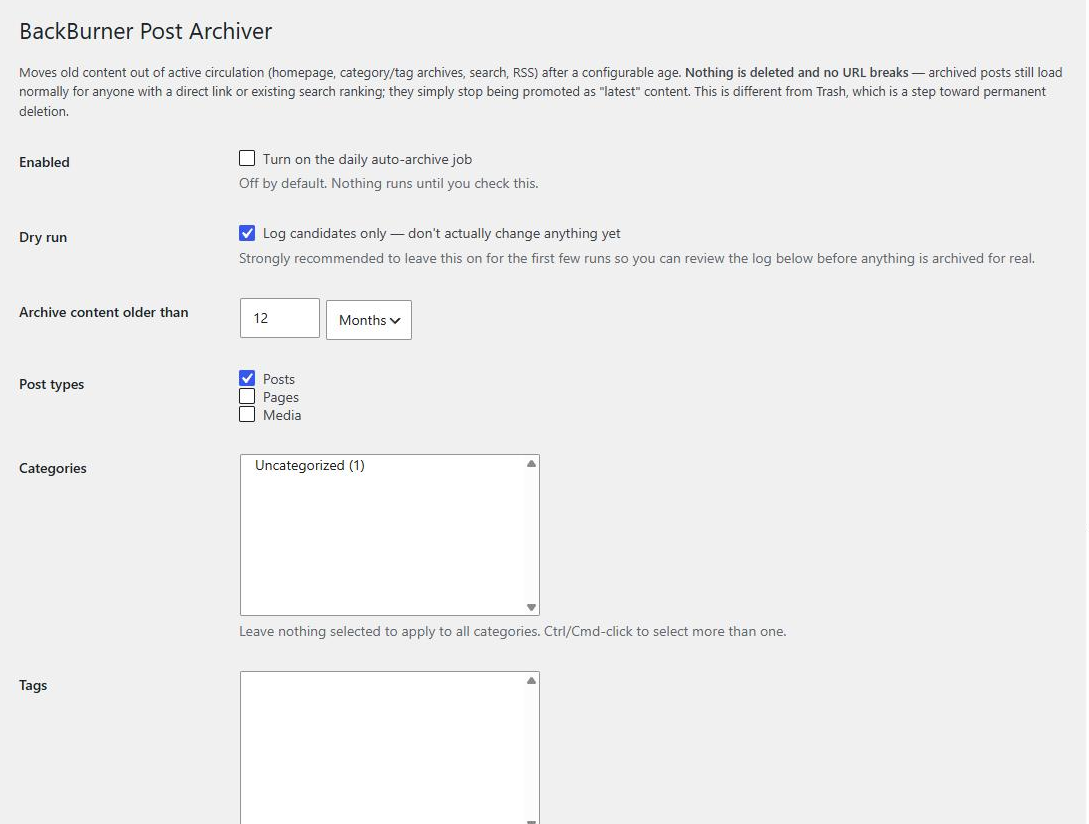
Set a single site-wide age threshold (in months) after which content is archived
Choose exactly which post types are included (Posts, Pages, Media, Products, and any other public custom post type)
Restrict archiving to specific categories and/or tags, or run it site-wide
Mark any individual post “Never auto-archive this post” to permanently exempt it, regardless of age
Archived content is moved to a dedicated “Archived” status – never trashed or deleted
Description from the author's listing. Read the full listing on WordPress.org
Screenshots
BackBurner Post Archiver in action
FAQ
BackBurner Post Archiver: questions and answers
What is BackBurner Post Archiver?
BackBurner Post Archiver is a WordPress plugin by techygeekshome. Automatically move old content out of active circulation after a configurable age – without ever deleting anything or breaking a single URL.
Is BackBurner Post Archiver free?
BackBurner Post Archiver is listed in the WordPress.org plugin directory, so the version there is free to download and use. Some authors also sell paid add-ons or a premium edition with more features and support.
Is BackBurner Post Archiver still maintained?
BackBurner Post Archiver was last updated on September 7, 2026. The current version is 1.0.8. Check the changelog on WordPress.org and test updates on a staging site before applying them to a live site.
What does BackBurner Post Archiver require?
BackBurner Post Archiver requires WordPress 5.8 or newer and PHP 7.4 or newer. It has been tested up to WordPress 7.1.5.
Can Codefreex set up or customize BackBurner Post Archiver?
Yes. Codefreex installs, configures and customizes WordPress plugins including BackBurner Post Archiver, fixes conflicts and performance problems, and builds custom features when a plugin does not do exactly what you need. Send your site URL for a free review.
Free expert review
Need BackBurner Post Archiver set up, customized or fixed?
Tell us about your site and what you need this plugin to do. A senior WordPress developer replies within one business day with a plan and a quote.