

WordPress plugin
Brain 2FA
Add two-factor authentication and passwordless passkey sign-in to WordPress accounts.
- Version
- 1.3.0
- Last updated
- Oct 29, 2026
- Tested up to
- WordPress 7.1.5
- Requires
- WP 6.4 · PHP 8.1
Health check
Is Brain 2FA safe to rely on?
Our reading of the public WordPress.org data: maintenance, compatibility, ratings and support.
Actively maintained
Last updated on October 29, 2026. Regular updates usually mean bugs and security reports get fixed.
Tested with current WordPress
The author has tested it up to WordPress 7.1.5.
Requires PHP 8.1 or newer
Check your hosting PHP version before installing. Modern PHP is faster and receives security fixes.
Rank tracker
Where Brain 2FA ranks in WordPress.org search
Its position in WordPress.org plugin search for its tags and name, refreshed weekly so you can see how its visibility changes.
| Keyword | Position | Change | Trend | Current #1 |
|---|---|---|---|---|
| 2fa | ||||
| authenticator | ||||
| security | ||||
| totp | ||||
| two factor authentication | ||||
| brain 2fa |
Checked against the top 100 WordPress.org search results.
Overview
What Brain 2FA does
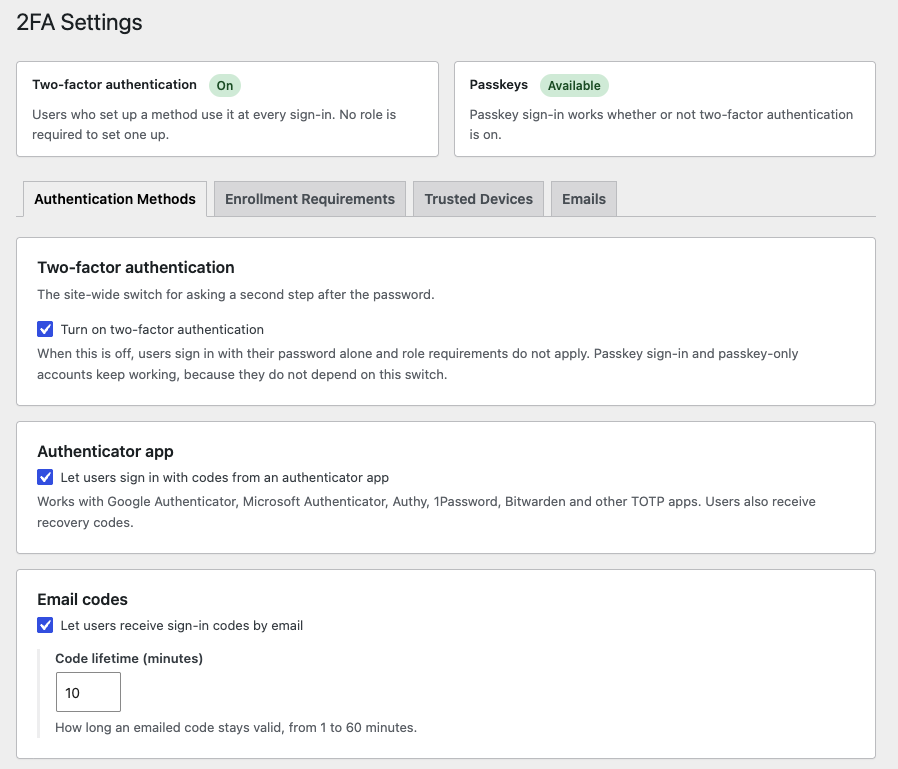
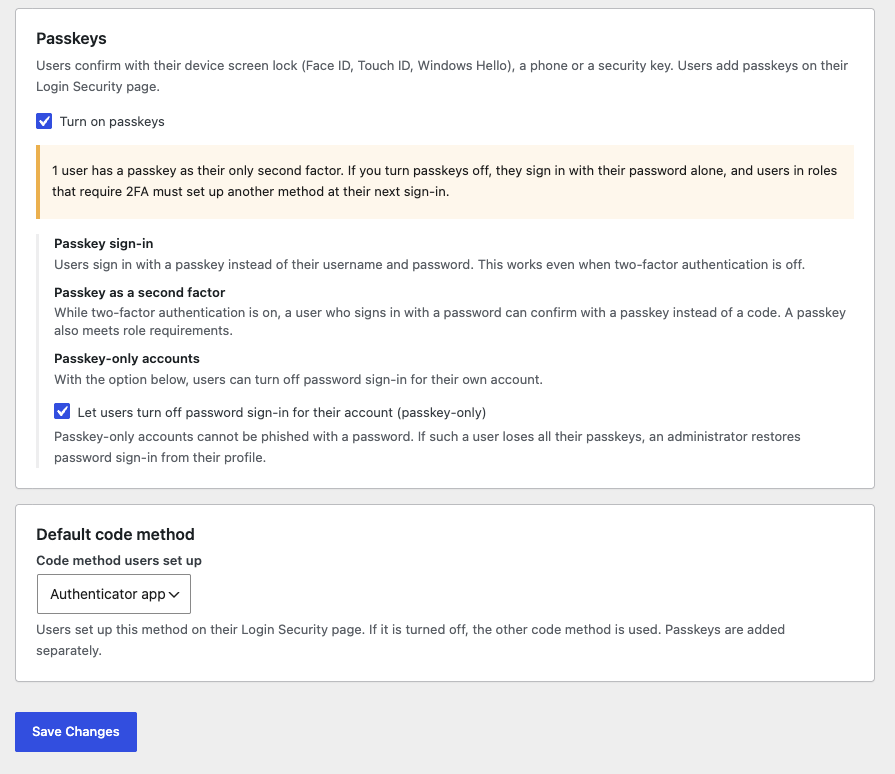
Brain 2FA protects WordPress accounts with a second authentication factor. After entering their password, users confirm their identity with a six-digit code from an authenticator app or from their email inbox. Users can also sign in without a password using a passkey.
Codes are generated and passkeys are verified on your own server. Brain 2FA does not send any data to third-party services.
Passkeys: Sign in without a password using Face ID, Touch ID, Windows Hello, a phone or a security key. Passkeys are offered right in the username field, and a passkey sign-in counts as two-factor authentication. A passkey can also be the second step after a password, counts toward required two-factor setup, and users can optionally turn off password sign-in entirely. Requires HTTPS; turn it on under Brain 2FA > Settings.
Authenticator apps (TOTP): Works with Google Authenticator, Microsoft Authenticator, Authy, 1Password, Bitwarden and any other TOTP-compatible app. Users set it up by scanning a QR code or entering the secret key manually. One-time recovery codes cover a lost phone, and users are warned in WordPress and on their WooCommerce account dashboard when only a few are left.
Email verification codes: Sends a one-time code to the account email address, with a configurable expiry time.
Recovery codes: TOTP users receive one-time recovery codes they can download and regenerate in case they lose their phone.
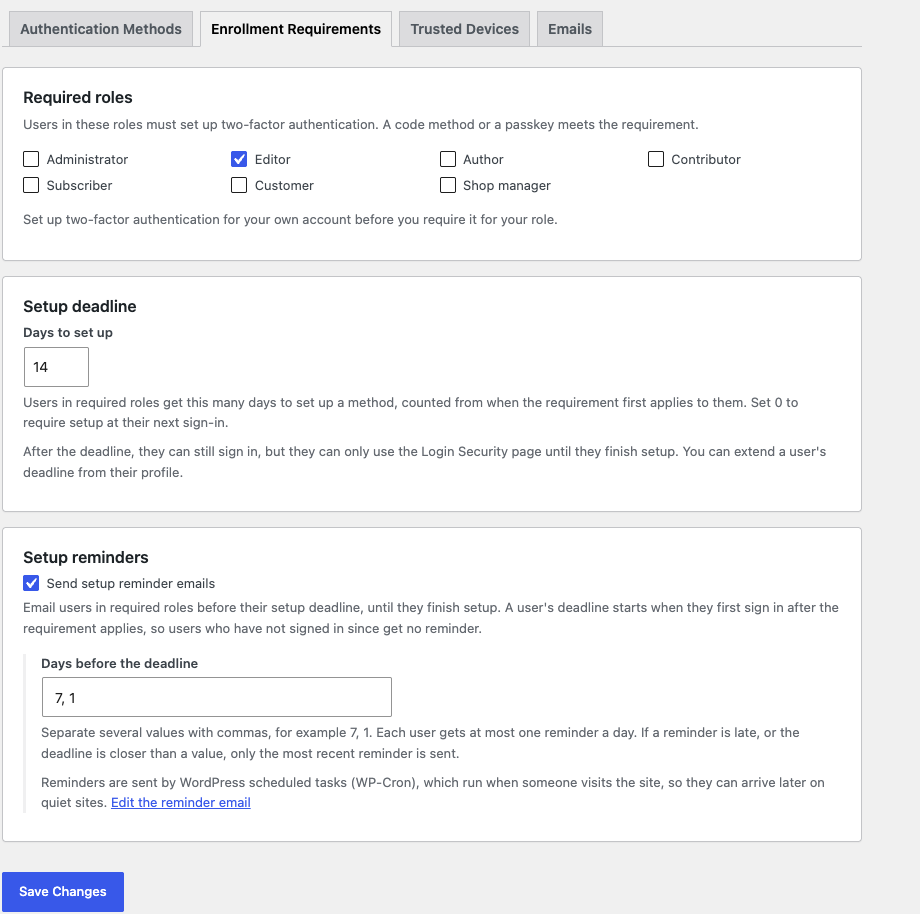
Role-based enforcement: Require two-factor authentication for selected user roles, such as Administrator,…
Description from the author's listing. Read the full listing on WordPress.org
Screenshots
Brain 2FA in action
FAQ
Brain 2FA: questions and answers
What is Brain 2FA?
Brain 2FA is a WordPress plugin by Braintum. Add two-factor authentication and passwordless passkey sign-in to WordPress accounts.
Is Brain 2FA free?
Brain 2FA is listed in the WordPress.org plugin directory, so the version there is free to download and use. Some authors also sell paid add-ons or a premium edition with more features and support.
Is Brain 2FA still maintained?
Brain 2FA was last updated on October 29, 2026. The current version is 1.3.0. Check the changelog on WordPress.org and test updates on a staging site before applying them to a live site.
What does Brain 2FA require?
Brain 2FA requires WordPress 6.4 or newer and PHP 8.1 or newer. It has been tested up to WordPress 7.1.5.
Can Codefreex set up or customize Brain 2FA?
Yes. Codefreex installs, configures and customizes WordPress plugins including Brain 2FA, fixes conflicts and performance problems, and builds custom features when a plugin does not do exactly what you need. Send your site URL for a free review.
Free expert review
Need Brain 2FA set up, customized or fixed?
Tell us about your site and what you need this plugin to do. A senior WordPress developer replies within one business day with a plan and a quote.