

WordPress plugin
BugPost
Simple frontend bug reporting overlay for WordPress. Visitors submit reports with auto-captured browser context and console errors.
- Version
- 1.2.3
- Last updated
- Apr 15, 2026
- Tested up to
- WordPress 6.9.12
- Requires
- WP 5.8 · PHP 7.4
Health check
Is BugPost safe to rely on?
Our reading of the public WordPress.org data: maintenance, compatibility, ratings and support.
Updated within the last year
Last updated on April 15, 2026. Test it on a staging copy before relying on it.
Not yet tested with the latest WordPress
Tested up to WordPress 6.9.12. It often still works, but check on staging first.
Requires PHP 7.4 or newer
Check your hosting PHP version before installing. Modern PHP is faster and receives security fixes.
Rank tracker
Where BugPost ranks in WordPress.org search
Its position in WordPress.org plugin search for its tags and name, refreshed weekly so you can see how its visibility changes.
| Keyword | Position | Change | Trend | Current #1 |
|---|---|---|---|---|
| bug report(WordPress.org search, opens in a new tab) | Not in top 100 | First check | WP Statistics – Simple, privacy-friendly Google Analytics alternative500K+ installs | |
| bug-tracking(WordPress.org search, opens in a new tab) | Not in top 100 | First check | Pixel Manager for WooCommerce – Conversion Tracking, Google Ads, GA4, TikTok, Dynamic Remarketing40K+ installs | |
| error reporting(WordPress.org search, opens in a new tab) | Not in top 100 | First check | Error Log Monitor20K+ installs | |
| feedback(WordPress.org search, opens in a new tab) | Not in top 100 | First check | UserFeedback – Create Interactive Feedback Form, User Surveys, and Polls in Seconds200K+ installs | |
| q a(WordPress.org search, opens in a new tab) | Not in top 100 | First check | Customer Reviews for WooCommerce80K+ installs | |
| bugpost(WordPress.org search, opens in a new tab) | #1 | First check | BugPostThis pluginUnder 10 installs |
Checked against the top 100 WordPress.org search results on .
Overview
What BugPost does
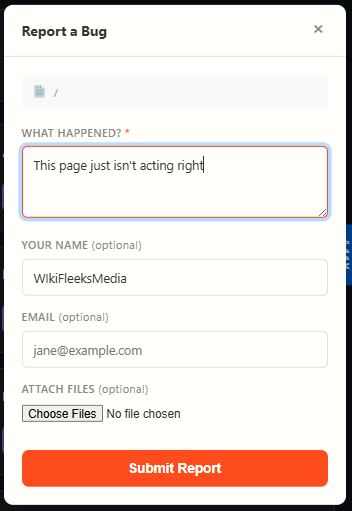
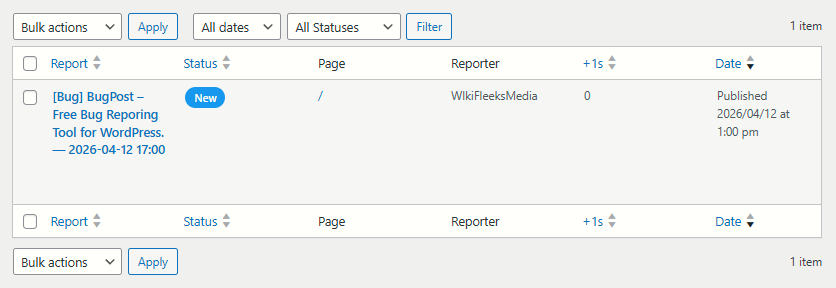
BugPost adds a lightweight bug reporting button to your site’s frontend. When clicked, it opens a clean overlay panel where visitors or team members can describe an issue. Browser details, operating system, viewport size, page URL, page load time, and JavaScript console errors are captured automatically — no extra effort needed from the reporter.
One-click reporting — A “Report” tab on the right side of every page opens a simple form.
Auto-captured context — Browser name and version, OS, viewport dimensions, page URL, page load time, and console errors are sent along with every report.
Console error capture — JavaScript errors and unhandled promise rejections are logged automatically and attached to the report.
Reporter fields — Optional name and email fields let reporters identify themselves.
Honeypot spam protection — A hidden field traps bots without annoying humans with CAPTCHAs.
Rate limiting — 3 reports per IP per hour prevents abuse.
Description from the author's listing. Read the full listing on WordPress.org
Screenshots
BugPost in action

FAQ
BugPost: questions and answers
What is BugPost?
BugPost is a WordPress plugin by wikifleeksmedia. Simple frontend bug reporting overlay for WordPress. Visitors submit reports with auto-captured browser context and console errors.
Is BugPost free?
BugPost is listed in the WordPress.org plugin directory, so the version there is free to download and use. Some authors also sell paid add-ons or a premium edition with more features and support.
Is BugPost still maintained?
BugPost was last updated on April 15, 2026. The current version is 1.2.3. Check the changelog on WordPress.org and test updates on a staging site before applying them to a live site.
What does BugPost require?
BugPost requires WordPress 5.8 or newer and PHP 7.4 or newer. It has been tested up to WordPress 6.9.12.
Can Codefreex set up or customize BugPost?
Yes. Codefreex installs, configures and customizes WordPress plugins including BugPost, fixes conflicts and performance problems, and builds custom features when a plugin does not do exactly what you need. Send your site URL for a free review.
Free expert review
Need BugPost set up, customized or fixed?
Tell us about your site and what you need this plugin to do. A senior WordPress developer replies within one business day with a plan and a quote.