

WordPress plugin
OrderBadger
Add colour-coded badge pills to your WooCommerce orders screen using plain-English rules. No code required.
- Version
- 1.1.0
- Last updated
- Apr 1, 2026
- Tested up to
- WordPress 6.9.12
- Requires
- WP 5.6 · PHP 7.4
Health check
Is OrderBadger safe to rely on?
Our reading of the public WordPress.org data: maintenance, compatibility, ratings and support.
Updated within the last year
Last updated on April 1, 2026. Test it on a staging copy before relying on it.
Not yet tested with the latest WordPress
Tested up to WordPress 6.9.12. It often still works, but check on staging first.
Requires PHP 7.4 or newer
Check your hosting PHP version before installing. Modern PHP is faster and receives security fixes.
Rank tracker
Where OrderBadger ranks in WordPress.org search
Its position in WordPress.org plugin search for its tags and name, refreshed weekly so you can see how its visibility changes.
| Keyword | Position | Change | Trend | Current #1 |
|---|---|---|---|---|
| customer history | ||||
| fraud detection | ||||
| order management | ||||
| order review | ||||
| shipping exceptions | ||||
| orderbadger |
Checked against the top 100 WordPress.org search results.
Overview
What OrderBadger does
Your WooCommerce orders screen shows what was ordered and how much it cost. It tells you almost nothing about who is ordering, why an order might need special attention, or what should happen differently for this one versus the last one.
The result is a workflow built on clicking. Staff open individual orders to check customer history. They miss a first-time buyer who deserved a welcome note, a serial returner who should have been reviewed before dispatch, or a VIP customer whose tenth order deserved better than the default experience.
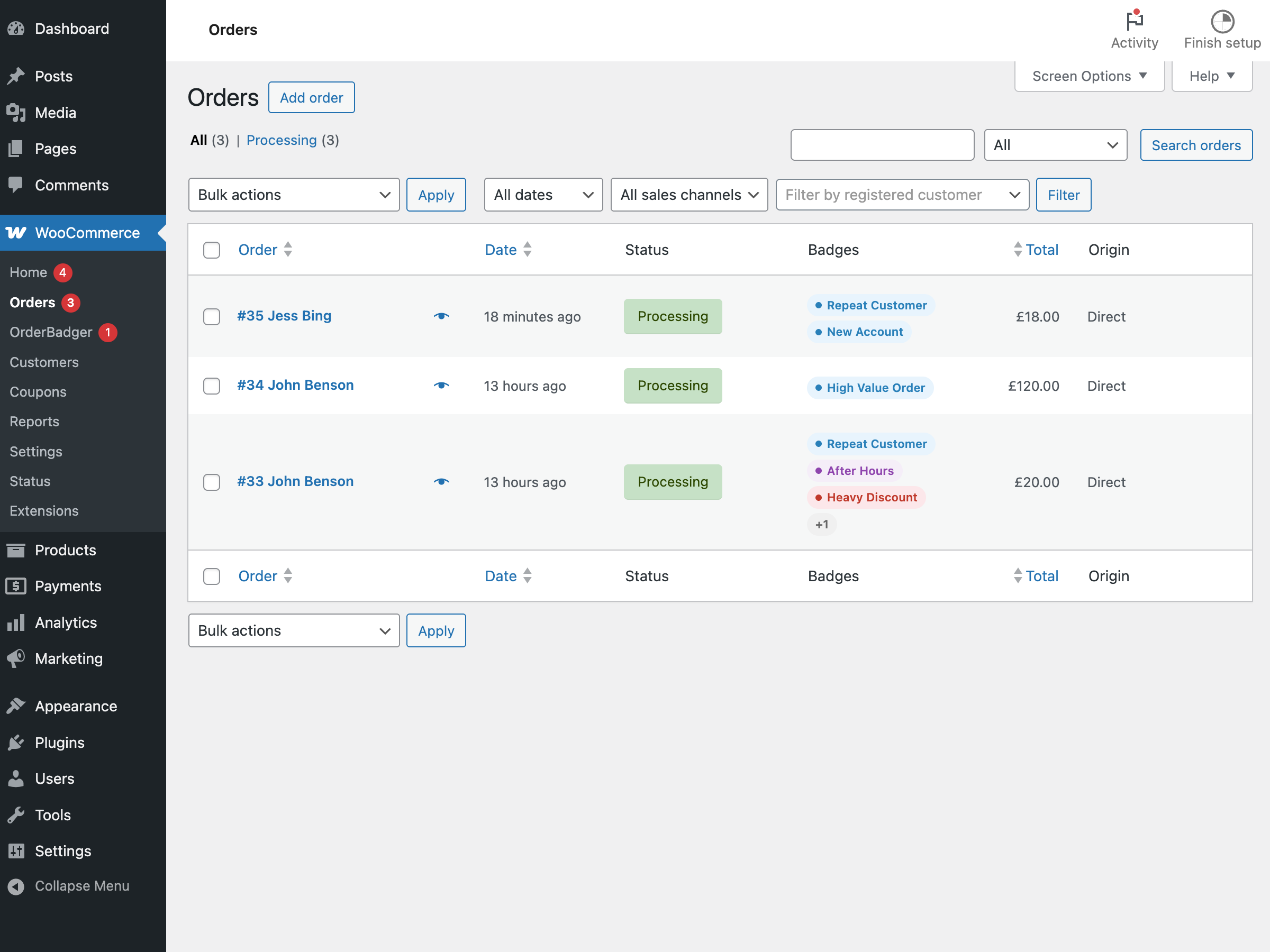
OrderBadger adds coloured badge pills to your WooCommerce orders screen based on rules you write in plain English. The moment an order arrives, matching badges appear. No clicking required. No developer involvement. No changes to your order status, your customer emails, or your integrations.
Badges, not statuses – the difference matters. Custom order status plugins change the actual WooCommerce order status, which triggers customer emails, distorts analytics, and can break payment gateway integrations. OrderBadger badges are a visual layer only. Your order stays “Processing”. WooCommerce, Stripe, your shipping plugin – none of them see anything different.
Write what you want in plain English. No dropdowns, no nested condition builders, no ceiling where you need a developer. Describe what matters to your business in a sentence:
“New customer account created in the last 7 days, order total over £200, requesting express delivery” (see example)
“Customer has placed 10 or more orders and has purchased from the…
Description from the author's listing. Read the full listing on WordPress.org
Screenshots
OrderBadger in action


FAQ
OrderBadger: questions and answers
What is OrderBadger?
OrderBadger is a WordPress plugin by smartfact. Add colour-coded badge pills to your WooCommerce orders screen using plain-English rules. No code required.
Is OrderBadger free?
OrderBadger is listed in the WordPress.org plugin directory, so the version there is free to download and use. Some authors also sell paid add-ons or a premium edition with more features and support.
Is OrderBadger still maintained?
OrderBadger was last updated on April 1, 2026. The current version is 1.1.0. Check the changelog on WordPress.org and test updates on a staging site before applying them to a live site.
What does OrderBadger require?
OrderBadger requires WordPress 5.6 or newer and PHP 7.4 or newer. It has been tested up to WordPress 6.9.12.
Can Codefreex set up or customize OrderBadger?
Yes. Codefreex installs, configures and customizes WordPress plugins including OrderBadger, fixes conflicts and performance problems, and builds custom features when a plugin does not do exactly what you need. Send your site URL for a free review.
Free expert review
Need OrderBadger set up, customized or fixed?
Tell us about your site and what you need this plugin to do. A senior WordPress developer replies within one business day with a plan and a quote.