

WordPress plugin
OtkazPro – Withdrawal Button for WooCommerce
The online “withdraw from the contract” button and form required by EU Directive 2023/2673 – for WooCommerce stores in Bulgaria and the EU.
- Version
- 2.1.0
- Last updated
- Nov 4, 2026
- Tested up to
- WordPress 7.1.5
- Requires
- WP 6.4 · PHP 7.4
Health check
Is OtkazPro – Withdrawal Button for WooCommerce safe to rely on?
Our reading of the public WordPress.org data: maintenance, compatibility, ratings and support.
Actively maintained
Last updated on November 4, 2026. Regular updates usually mean bugs and security reports get fixed.
Tested with current WordPress
The author has tested it up to WordPress 7.1.5.
Requires PHP 7.4 or newer
Check your hosting PHP version before installing. Modern PHP is faster and receives security fixes.
Rank tracker
Where OtkazPro ranks in WordPress.org search
Its position in WordPress.org plugin search for its tags and name, refreshed weekly so you can see how its visibility changes.
| Keyword | Position | Change | Trend | Current #1 |
|---|---|---|---|---|
| gdpr | ||||
| returns | ||||
| right of withdrawal | ||||
| withdrawal | ||||
| woocommerce | ||||
| otkazpro |
Checked against the top 100 WordPress.org search results.
Overview
What OtkazPro – Withdrawal Button for WooCommerce does
Since 2026, online shops in the EU must let consumers withdraw from a distance contract through an easily accessible online function (EU Directive 2023/2673; in Bulgaria Art. 52a of the Consumer Protection Act, in force since 24 September 2026). OtkazPro adds exactly that to WooCommerce – without forcing the customer to log in or give a reason.
For the customer – two clicks
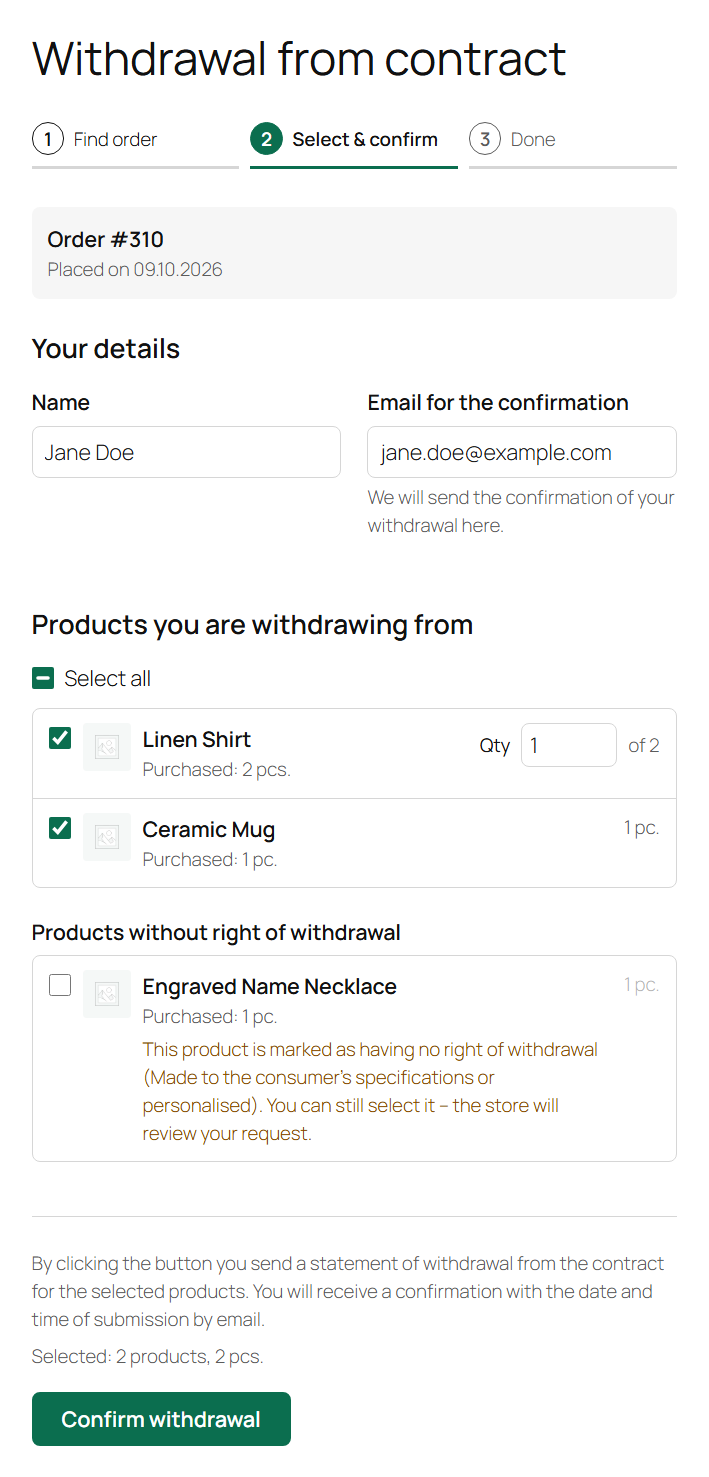
A clearly labelled “Withdraw from the contract here” button: in order emails, in My account → Orders, and on a dedicated page you can link from the footer.
Guests find their order with the order number + email; links from emails open the order directly.
All eligible products are pre-selected; the customer can untick products or lower quantities (partial withdrawal), then clicks “Confirm withdrawal”.
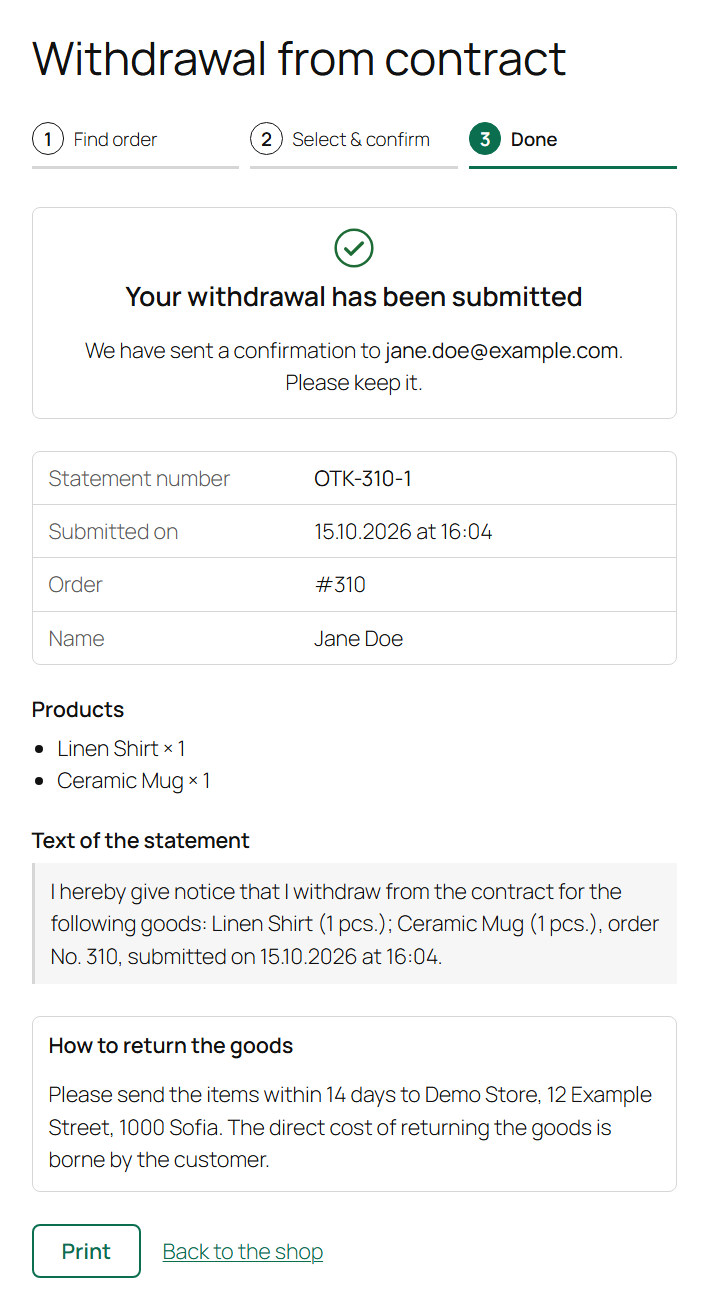
A confirmation with the statement number, date, time, products and the full text of the statement is emailed immediately (durable medium).
Register of all statements (WooCommerce → Withdrawals) with filters, CSV export, IP and user agent as evidence, and “Resend confirmation”.
Description from the author's listing. Read the full listing on WordPress.org
Screenshots
OtkazPro – Withdrawal Button for WooCommerce in action

FAQ
OtkazPro – Withdrawal Button for WooCommerce: questions and answers
What is OtkazPro – Withdrawal Button for WooCommerce?
OtkazPro – Withdrawal Button for WooCommerce is a WordPress plugin by Project Yordanov. The online “withdraw from the contract” button and form required by EU Directive 2023/2673 – for WooCommerce stores in Bulgaria and the EU.
Is OtkazPro – Withdrawal Button for WooCommerce free?
OtkazPro – Withdrawal Button for WooCommerce is listed in the WordPress.org plugin directory, so the version there is free to download and use. Some authors also sell paid add-ons or a premium edition with more features and support.
Is OtkazPro – Withdrawal Button for WooCommerce still maintained?
OtkazPro – Withdrawal Button for WooCommerce was last updated on November 4, 2026. The current version is 2.1.0. Check the changelog on WordPress.org and test updates on a staging site before applying them to a live site.
What does OtkazPro – Withdrawal Button for WooCommerce require?
OtkazPro – Withdrawal Button for WooCommerce requires WordPress 6.4 or newer and PHP 7.4 or newer. It has been tested up to WordPress 7.1.5.
Can Codefreex set up or customize OtkazPro – Withdrawal Button for WooCommerce?
Yes. Codefreex installs, configures and customizes WordPress plugins including OtkazPro – Withdrawal Button for WooCommerce, fixes conflicts and performance problems, and builds custom features when a plugin does not do exactly what you need. Send your site URL for a free review.
Free expert review
Need OtkazPro – Withdrawal Button for WooCommerce set up, customized or fixed?
Tell us about your site and what you need this plugin to do. A senior WordPress developer replies within one business day with a plan and a quote.