

WordPress plugin
QuickStock for WooCommerce
WooCommerce stock & inventory manager: smart reorder, bulk editing, barcode labels and stock history.
- Version
- 5.13.30
- Last updated
- Nov 16, 2026
- Tested up to
- WordPress 7.1.5
- Requires
- WP 6.2 · PHP 7.4
Health check
Is QuickStock for WooCommerce safe to rely on?
Our reading of the public WordPress.org data: maintenance, compatibility, ratings and support.
Actively maintained
Last updated on November 16, 2026. Regular updates usually mean bugs and security reports get fixed.
Tested with current WordPress
The author has tested it up to WordPress 7.1.5.
Requires PHP 7.4 or newer
Check your hosting PHP version before installing. Modern PHP is faster and receives security fixes.
Rank tracker
Where QuickStock for WooCommerce ranks in WordPress.org search
Its position in WordPress.org plugin search for its tags and name, refreshed weekly so you can see how its visibility changes.
| Keyword | Position | Change | Trend | Current #1 |
|---|---|---|---|---|
| barcode labels | ||||
| inventory | ||||
| low stock | ||||
| reorder | ||||
| stock manager | ||||
| quickstock for woocommerce |
Checked against the top 100 WordPress.org search results.
Overview
What QuickStock for WooCommerce does
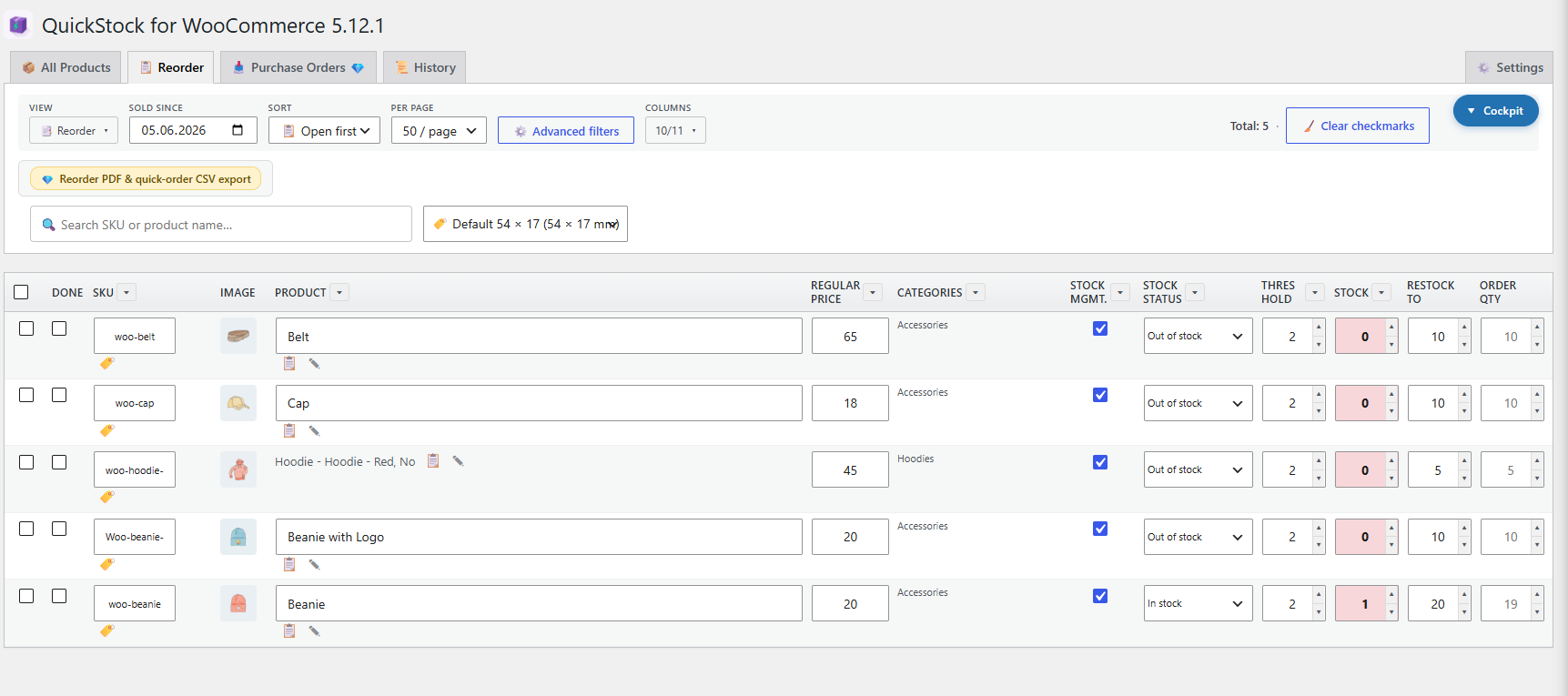
QuickStock for WooCommerce adds a fast, dedicated stock and inventory management workspace to your WooCommerce backend. You get inline editing for every stock-relevant field across the All Products and Reorder tabs — plus a sticky header, configurable columns, density modes and keyboard shortcuts — with a separate Stock History tab that records every change. It is built for shop owners who spend real time on stock control and want to stop bouncing between the WooCommerce product list, individual product screens and external spreadsheets.
Smart Reorder tab that surfaces low-stock and out-of-stock products in one place
Bulk editing for stock, stock status, prices, sale prices (absolute or %), sale schedules, categories, shipping class, delivery time and post status
Barcode label designer with multiple named templates, freely positioned product name, barcode and price fields, plus live preview
Stock history log with source tracking (manual vs. order), filter, CSV export and configurable retention (30 / 90 / 365 days / unlimited)
CSV export with locale-aware options (delimiter, BOM, date format) — Excel/DE-friendly
Field library: turn any of the 50+ built-in columns or product attributes into table columns — with compact / normal / comfortable row density and a sticky header for long lists
Description from the author's listing. Read the full listing on WordPress.org
Screenshots
QuickStock for WooCommerce in action


FAQ
QuickStock for WooCommerce: questions and answers
What is QuickStock for WooCommerce?
QuickStock for WooCommerce is a WordPress plugin by mlplugins. WooCommerce stock & inventory manager: smart reorder, bulk editing, barcode labels and stock history.
Is QuickStock for WooCommerce free?
QuickStock for WooCommerce is listed in the WordPress.org plugin directory, so the version there is free to download and use. Some authors also sell paid add-ons or a premium edition with more features and support.
Is QuickStock for WooCommerce still maintained?
QuickStock for WooCommerce was last updated on November 16, 2026. The current version is 5.13.30. Check the changelog on WordPress.org and test updates on a staging site before applying them to a live site.
What does QuickStock for WooCommerce require?
QuickStock for WooCommerce requires WordPress 6.2 or newer and PHP 7.4 or newer. It has been tested up to WordPress 7.1.5.
Can Codefreex set up or customize QuickStock for WooCommerce?
Yes. Codefreex installs, configures and customizes WordPress plugins including QuickStock for WooCommerce, fixes conflicts and performance problems, and builds custom features when a plugin does not do exactly what you need. Send your site URL for a free review.
Free expert review
Need QuickStock for WooCommerce set up, customized or fixed?
Tell us about your site and what you need this plugin to do. A senior WordPress developer replies within one business day with a plan and a quote.