
WordPress plugin
Text Domain Inspector
Text Domain Inspector is a plugin that helps to inspect text domains of translatable strings
- Active installs
- 400+
- Rating
- 4.0 / 5
- Version
- 1.1.1
- Last updated
- Jun 14, 2024
- Tested up to
- WordPress 6.5.15
- Requires
- WP 4.6
Health check
Is Text Domain Inspector safe to rely on?
Our reading of the public WordPress.org data: maintenance, compatibility, ratings and support.
No update in over a year
Last updated on June 14, 2024. It may not be compatible with current WordPress or PHP, and unfixed issues are a security risk.
Not yet tested with the latest WordPress
Tested up to WordPress 6.5.15. It often still works, but check on staging first.
Few ratings so far
Only 4 ratings on WordPress.org, so the average is not yet a reliable signal.
Rank tracker
Where Text Domain Inspector ranks in WordPress.org search
Its position in WordPress.org plugin search for its tags and name, refreshed weekly so you can see how its visibility changes.
| Keyword | Position | Change | Trend | Current #1 |
|---|---|---|---|---|
| domain(WordPress.org search, opens in a new tab) | Not in top 100 | First check | UpdraftPlus: WP Backup & Migration Plugin4M+ installs | |
| inspector(WordPress.org search, opens in a new tab) | #66 | First check | Rewrite Rules Inspector10K+ installs | |
| text(WordPress.org search, opens in a new tab) | Not in top 100 | First check | Image Alt Text10K+ installs | |
| text domain(WordPress.org search, opens in a new tab) | #48 | First check | UpdraftPlus: WP Backup & Migration Plugin4M+ installs | |
| translation(WordPress.org search, opens in a new tab) | Not in top 100 | First check | TranslatePress – Translate Multilingual sites with AI Translation400K+ installs | |
| text domain inspector(WordPress.org search, opens in a new tab) | #3 | First check | Text Replace – Find and Replace WordPress Strings400+ installs |
Checked against the top 100 WordPress.org search results on .
Overview
What Text Domain Inspector does
Have you ever been frustrated when trying to find the text domain of translatable string you want to translate? This task can be challenging and it can take a lot of your time even if you have code reading skills.
This plugin aims to solve this problem by allowing website administrator to inspect text domains of translatable strings directly in the browser.
* Press “Inspect Text Domains” button in admin menu bar;
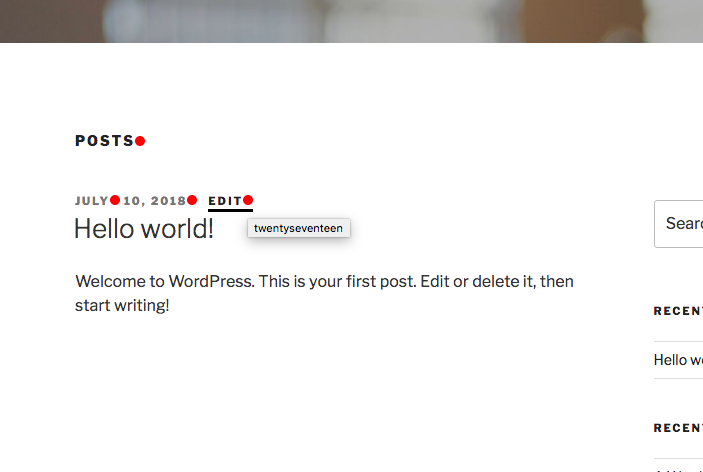
* Red dots will appear next to translatable strings;
* Hover the red dot to view the text domain;
* Open source code in the browser to view text domains in HTML attributes (ctrl+u (Windows) / cmd+opt+u (Mac));
* Dynamically loaded content (through AJAX);
Description from the author's listing. Read the full listing on WordPress.org
Screenshots
Text Domain Inspector in action


FAQ
Text Domain Inspector: questions and answers
What is Text Domain Inspector?
Text Domain Inspector is a WordPress plugin by laugei. Text Domain Inspector is a plugin that helps to inspect text domains of translatable strings
Is Text Domain Inspector free?
Text Domain Inspector is listed in the WordPress.org plugin directory, so the version there is free to download and use. Some authors also sell paid add-ons or a premium edition with more features and support.
How many websites use Text Domain Inspector?
WordPress.org reports 400+ active installations of Text Domain Inspector. That figure counts sites running the WordPress.org version and is rounded down by WordPress.org.
Is Text Domain Inspector still maintained?
Text Domain Inspector was last updated on June 14, 2024. The current version is 1.1.1. Check the changelog on WordPress.org and test updates on a staging site before applying them to a live site.
What does Text Domain Inspector require?
Text Domain Inspector requires WordPress 4.6 or newer. It has been tested up to WordPress 6.5.15.
Can Codefreex set up or customize Text Domain Inspector?
Yes. Codefreex installs, configures and customizes WordPress plugins including Text Domain Inspector, fixes conflicts and performance problems, and builds custom features when a plugin does not do exactly what you need. Send your site URL for a free review.
Free expert review
Need Text Domain Inspector set up, customized or fixed?
Tell us about your site and what you need this plugin to do. A senior WordPress developer replies within one business day with a plan and a quote.