

WordPress plugin
WooCommerce Stripe Payment Gateway
Accept debit and credit cards in 135+ currencies, many local methods like Alipay, ACH, and SEPA, and express checkout with Apple Pay and Google Pay.
- Active installs
- 700K+
- Rating
- 3.1 / 5
- Version
- 11.2.0
- Last updated
- Nov 10, 2026
- Tested up to
- WordPress 7.1.4
- Requires
- WP 6.9 · PHP 7.4
Health check
Is WooCommerce Stripe Payment Gateway safe to rely on?
Our reading of the public WordPress.org data: maintenance, compatibility, ratings and support.
Actively maintained
Last updated on November 10, 2026. Regular updates usually mean bugs and security reports get fixed.
Tested with current WordPress
The author has tested it up to WordPress 7.1.4.
Low user ratings
Rated 3.1 out of 5 from 238 ratings on WordPress.org.
Responsive support
27 of 35 recent support threads on WordPress.org are marked resolved.
Requires PHP 7.4 or newer
Check your hosting PHP version before installing. Modern PHP is faster and receives security fixes.
Rank tracker
Where WooCommerce Stripe Payment Gateway ranks in WordPress.org search
Its position in WordPress.org plugin search for its tags and name, refreshed weekly so you can see how its visibility changes.
| Keyword | Position | Change | Trend | Current #1 |
|---|---|---|---|---|
| credit card | ||||
| payments | ||||
| stripe | ||||
| woo | ||||
| woocommerce | ||||
| woocommerce stripe payment |
Checked against the top 100 WordPress.org search results.
Overview
What WooCommerce Stripe Payment Gateway does
Changing consumer behavior has resulted in an explosion of payment methods and experiences, which are great for increasing conversion and lowering costs—but can be difficult for businesses to maintain. Give customers a best-in-class checkout experience while you remain focused on your core business. This is the official plugin created by Stripe and WooCommerce.
Drive 11.9% in revenue with an optimized checkout experience from Stripe
The enhanced checkout experience from Stripe can help customers:
Boost conversion: Provide an optimal experience across mobile, tablet, and desktop with a responsive checkout, and offer 23 payment methods, including Link, Apple Pay, and Google Pay, out of the box.
Expand your customer base: Convert customers who might otherwise abandon their cart with buy now, pay later methods like Klarna, Affirm, and Afterpay/Clearpay, wallets like Apple Pay, Google Pay, Alipay, and WeChat Pay, and local payment methods such as Bancontact in Europe and Alipay in Asia Pacific. Deliver a localized payment experience with out-of-the-box support for localized error messages, right-to-left languages, and automatic adjustment of input fields based on payment method and country.
Meet existing customer demand and localize the experience: Offer local payment methods, such as ACH Direct Debit, Bacs Direct Debit, Bancontact, BECS Direct Debit, BLIK, Boleto, Cash App Pay, EPS, iDEAL, Multibanco, OXXO, Pre-authorized debit payments, Przelewy 24, and SEPA Direct Debit, and let customers pay in their local currency across 150+ countries…
Description from the author's listing. Read the full listing on WordPress.org
Screenshots
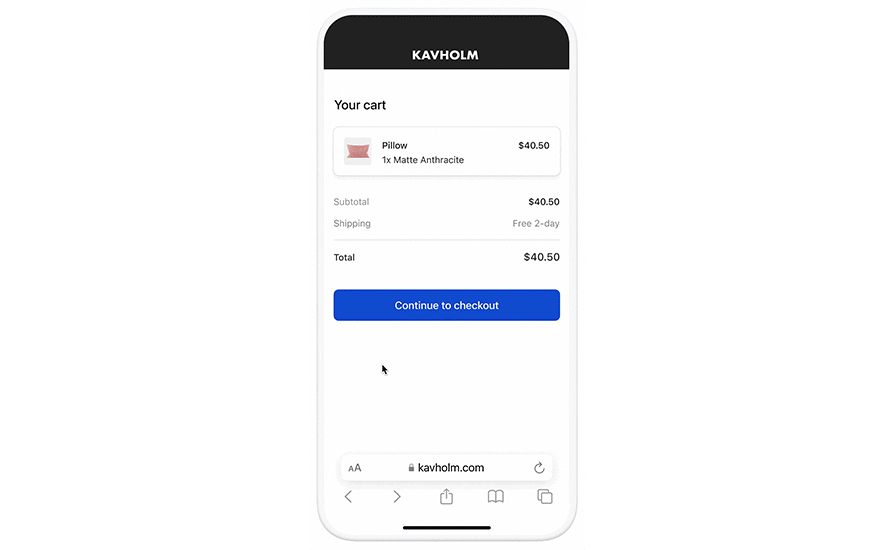
WooCommerce Stripe Payment Gateway in action


FAQ
WooCommerce Stripe Payment Gateway: questions and answers
What is WooCommerce Stripe Payment Gateway?
WooCommerce Stripe Payment Gateway is a WordPress plugin by WooCommerce. Accept debit and credit cards in 135+ currencies, many local methods like Alipay, ACH, and SEPA, and express checkout with Apple Pay and Google Pay.
Is WooCommerce Stripe Payment Gateway free?
WooCommerce Stripe Payment Gateway is listed in the WordPress.org plugin directory, so the version there is free to download and use. Some authors also sell paid add-ons or a premium edition with more features and support.
How many websites use WooCommerce Stripe Payment Gateway?
WordPress.org reports 700K+ active installations of WooCommerce Stripe Payment Gateway. That figure counts sites running the WordPress.org version and is rounded down by WordPress.org.
Is WooCommerce Stripe Payment Gateway still maintained?
WooCommerce Stripe Payment Gateway was last updated on November 10, 2026. The current version is 11.2.0. Check the changelog on WordPress.org and test updates on a staging site before applying them to a live site.
What does WooCommerce Stripe Payment Gateway require?
WooCommerce Stripe Payment Gateway requires WordPress 6.9 or newer and PHP 7.4 or newer. It has been tested up to WordPress 7.1.4.
Can Codefreex set up or customize WooCommerce Stripe Payment Gateway?
Yes. Codefreex installs, configures and customizes WordPress plugins including WooCommerce Stripe Payment Gateway, fixes conflicts and performance problems, and builds custom features when a plugin does not do exactly what you need. Send your site URL for a free review.
Free expert review
Need WooCommerce Stripe Payment Gateway set up, customized or fixed?
Tell us about your site and what you need this plugin to do. A senior WordPress developer replies within one business day with a plan and a quote.